





Introduction
Picture a bookkeeper for a small business trying to close the month while three invoices are waiting in an inbox, one approval is stuck with a manager who happens to be out of the office, and the owner is asking how much cash is available. That's when manual AP processing stops feeling manageable, and automation software for accounts payable becomes necessary. AP automation helps by capturing invoice data, routing invoices to the right approvers, tracking what's been approved or paid and when, and showing what the business owes before payments go out.
In this article, we'll take a look at the most common AP pain points small businesses face and the best accounts payable automation software options on the market, so you can choose a solution that fits your needs and budget.
What is accounts payable software?
AP software is usually a digital system for managing supplier invoices, approvals, payments, and accounting records in a centralized platform. It replaces scattered email threads and spreadsheets with a clearer process for reviewing bills and preparing payments.
Many platforms also support purchase order (PO) matching, approval controls, payment tracking, vendor records, and audit trails. Some are designed for everyday accounting tasks, while others support more advanced AP automation needs.
Common options include Quadient Accounts Payable Automation, QuickBooks Online, Xero, Tipalti, Melio and Zoho Books.
Common accounts payable challenges small businesses face
Many small businesses manage AP through a mix of email, spreadsheets, basic accounting tools, and sometimes even pen and paper. That approach may seem fine for a time, but it becomes harder to control the overall thing as invoice volume grows.
Manually managing AP remains fairly common. In fact, Ardent Partners' 2025 State of ePayables report notes that 48.6 percent of invoices are still submitted manually. Yes, that's almost half of the invoices. For many finance teams, that means there is still a clear opportunity to reduce manual entry, approval follow-up, as well as payment tracking.
Challenge | What it looks like | Why it matters |
Manual invoice processing takes a lot of time | Bookkeepers and finance teams enter invoice details by hand, check amounts, chase approvals, and update payment statuses. | Teams lose time to daily admin instead of focusing on higher-value work. |
Errors (such as duplicate payments) are easier to miss | Incorrect vendor details, due dates, account codes, or payment amounts can slip through. | These mistakes can delay reconciliation or, worse, lead to duplicate payments. |
Payment deadlines are harder to manage | Invoices get buried in email while the team focuses on customers, payroll, or other work. | Missed due dates can lead to late fees and strained vendor relationships. |
Cash flow visibility is not great | Invoice data is scattered across emails, spreadsheets, and accounting software. | Owners have a harder time seeing what the business owes before making spending decisions. |
Higher invoice volume makes manual AP harder to control | More vendors and invoices mean more follow-ups, reminders, and status checks. | Small teams may struggle to keep up without adding more manual work. |
What features should accounts payable software include?
The best AP software can reduce manual work from your invoice process without adding complexity. Start with the parts of the process that slow your team down most, such as invoice entry, approval follow-up, accounting updates, or status tracking.
- AI invoice capture uses OCR invoice scanning to extract details such as vendor names, invoice numbers, due dates, amounts, and line items. With AI invoice capture, finance teams can cut down on manual data entry and review invoices sooner.
- Custom approval routing gets invoices to the right person based on rules you set, such as amount, vendor, department, location, or purchase type. Custom routing allows teams to keep approval workflows organized and to get an easy view of who approved what.
- Accounting and ERP integrations connect AP software with the platforms your business already uses, such as QuickBooks, Xero, or an ERP system. These integrations are really important, as they can reduce duplicate data entry and keep invoice, payment, and vendor information in sync.
- Purchase order matching compares invoices against POs before payment. For businesses that receive goods before paying suppliers, three-way matching compares the invoice, purchase order, and receipt before the payment is approved.
- Real-time dashboards and reporting show open invoices, approval status, upcoming payments, exceptions, and spending trends in one place. Such dashboards allow finance teams to see which invoices are waiting, which payments are coming up, and where someone needs to step in.
- Cloud-based and mobile access lets finance teams and approvers review invoices from different locations. Managers can approve bills from anywhere, keeping payments moving when they are away from their desks.
- Multi-entity and multi-currency support lets businesses manage complex company structures and pay international vendors. That means separate approval rules, reporting views, and user permissions for different locations, departments, or entities.
How do you choose the right accounts payable software?
To choose AP software, review your invoice volume, approval process, accounting integrations, ease of use, pricing, and support needs. The right option should fix the problems slowing your team down today without creating new work as invoice volume grows.
Before comparing tools, pressure-test each option against five buying criteria.
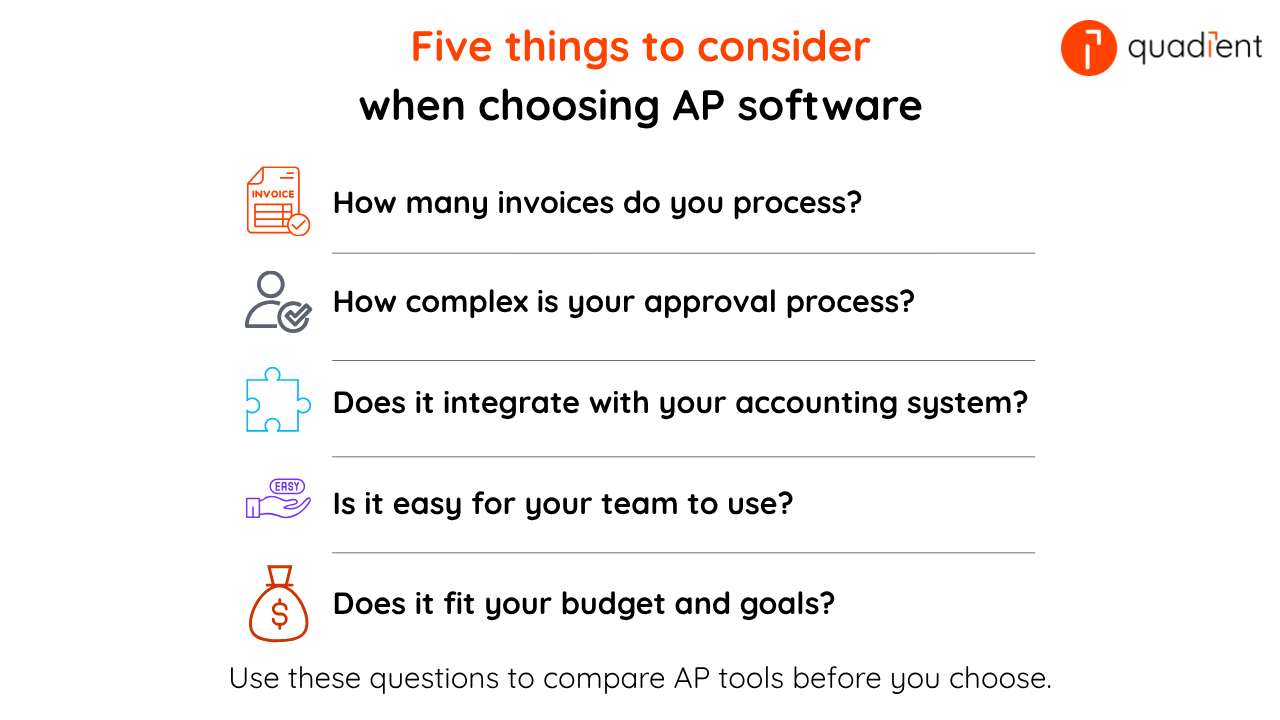
1. Consider your invoice volume and approval requirements
Try to assess, on average, how many invoices you process each month. Then also think about the number of people who approve invoices within your organization. Finally if you can assess at which stage invoices usually get delayed, it will help you to find the best solution for your business.
2. Check that the solution is easy to use
AP software should be simple for your team to learn and use. If the system feels too complex, people may continue using email and spreadsheets.
Look for a clean interface, clear approval steps, and everyday tasks that are easy to complete, such as reviewing invoice details, approving bills, resolving exceptions, and checking payment status.
3. Confirm accounting integrations
Your AP software should connect with the accounting tools you already use. For many small businesses, that means QuickBooks or Xero.
Strong integrations keep invoice, payment, and vendor data consistent across systems.
4. Compare pricing and return on investment
Price is important, but it should not be the only deciding factor. Consider how much time your team can save, how many errors they can reduce, where approval delays can be avoided, and what visibility the business can gain.
A good AP automation solution should save enough time and rework to justify the cost.
5. Ask about onboarding and support
Implementation should be manageable for a small team. Ask each vendor what onboarding includes, how integrations are set up, and what support is available after launch.
Strong support makes setup easier, helps your team resolve questions faster, and keeps AP work moving after launch.
Before you buy
During the demo, ask the sales team to show you, in detail, how an invoice moves from receipt to approval to payment in their solution. A short walkthrough can reveal whether the software fits your team’s real process or just looks good in a demo.
Best accounts payable software for small businesses in 2026
The best AP software for a small business depends on invoice volume, approval complexity, payment needs, accounting integrations, and budget. Here are several accounts payable software options small businesses may consider.
AP software | Works best for | Main strengths | Good fit for |
|---|---|---|---|
Quadient Accounts Payable | Automated AP workflows and QuickBooks integration | Invoice automation, GL coding, approval routing, reporting, and accounting sync. | Growing businesses that want automated AP workflows, accounting integration, and better visibility into invoice approvals. |
Tipalti | Scaling global payments | Multi-currency payments, supplier onboarding, tax requirements, compliance support, and entity-level controls. | Businesses managing global suppliers, multiple currencies, and more complex payment requirements. |
Melio | Easy payments and flexibility | Bill payments, payment scheduling, and flexible payment methods. | Small teams that want a simple way to manage vendor payments and payment timing. |
QuickBooks Online | Existing QuickBooks users | Bill tracking, due dates, vendor records, payments, and financial reporting in one accounting platform. | Businesses already managing accounting in QuickBooks that want to handle AP tasks in the same environment. |
Xero | Streamlined accounting and invoicing | Cloud accounting, bill entry, approvals, payment planning, and cash flow visibility. | Businesses that want AP tools within cloud accounting software. |
Zoho Books | Budget-friendly automation | Vendor bill management, purchase orders, recurring bills, payments, and AP reporting. | Cost-conscious teams looking for accounting and AP features in one platform. |
Not every tool is built for the same AP problem. QuickBooks Online, Xero, and Zoho Books may work well for businesses that want AP features built into their accounting software. Melio may be a good fit for teams focused on payment flexibility. Tipalti may be better suited to businesses with global supplier payments. Quadient AP may be a good fit for growing teams that want invoice automation, approval routing, reporting, and QuickBooks integration.
What are the benefits of accounts payable software?
AP software gives small businesses a more controlled way to manage invoices, approvals, and payments. When invoices are easier to track, finance teams don't have to dig through emails or spreadsheets to see what is due, approved, or waiting on someone.
1. Improve cash flow management
AP software gives teams a clear view of which invoices are due, which payments are coming up, and where cash is already committed. That visibility lets small businesses time payments carefully, avoid cash flow surprises, and take early payment discounts when it makes sense.
2. Reduce errors and duplicate payments
AP software reduces manual data entry, which lowers the risk of incorrect amounts, vendor details, due dates, and account codes. Matching tools and approval controls can catch duplicate invoices before payment.
3. Gain real-time visibility
Real-time visibility helps owners and finance leads see what's been received, what's waiting for approval, what's scheduled for payment, and what may need follow-up. This reduces guesswork when making cash flow and operating decisions.
4. Save time through automation
AP automation reduces repetitive work such as invoice entry, approval follow-up, status checks, and manual updates to spreadsheets. That gives bookkeepers and finance teams more time for reporting, reconciliation, planning, and vendor support.
5. Build stronger vendor relationships
A more reliable AP process makes it easier to pay vendors on time, answer supplier questions faster, and avoid surprises that can strain relationships.
6. Support remote approvals
Cloud-based approvals help invoices keep moving when owners, finance leads, or managers are traveling, working remotely, or away from their desks. This is especially useful for small teams where one delayed approval can hold up payment.
What is the future of AP automation for small businesses?
AP automation is becoming easier and easier for small businesses to access. AI is improving invoice capture and data validation. Payment tools are becoming easier to connect with accounting systems. Fraud detection is also gaining more attention as businesses move more payments online.
Cloud adoption will continue to make AP automation more affordable for smaller teams. Businesses can add stronger controls and better reporting without large IT projects.
More AP tools are connecting invoice processing, payments, and accounting updates into a single workflow. For small businesses, that means fewer handoffs between systems and a clearer view of finance work as they grow.
Conclusion
Accounts payable automation software can offer small businesses a more reliable way to manage invoices, approvals, and payments as they grow. By reducing manual work and improving visibility, finance teams can process bills faster and make more informed payment decisions.
Quadient AP automation reduces manual work, streamlines approvals, and provides real-time visibility into AP. As Sarah R., Accounts Payable Manager at Homepoint, said about Quadient AP, “We’ve saved between three and five minutes per invoice in processing by eliminating the more administrative work.”
For small business owners and finance teams, that can mean fewer missed invoices, reduced approval delays, fewer manual tasks, and a clearer view of what the business owes. For small finance teams, that means fewer surprises, fewer follow-ups, and more control over the work behind every payment.