






Digital invoicing is no longer a “someday” project for SMB finance teams. It’s becoming the practical way to keep invoice processing clean, controlled, and scalable as e-invoicing requirements expand across markets. And while mandates get the headlines, most teams modernize for a simpler reason: fewer exceptions, faster approvals, better visibility, and less risk. This article builds on key themes discussed during our recent digital invoicing webinar, where finance leaders shared how they’re modernizing AP workflows without waiting for mandates.
If your AP workload feels like a constant game of catch-up (inbox invoices, PDF attachments, approval chasing, vendor follow-ups, and month-end stress), you’re not alone. The shift to digital invoicing is really a shift to better invoice data and more reliable workflows, so you can process invoices with less friction now and avoid a rushed compliance scramble later.
Why “wait for mandates” is the most expensive plan
Many countries are tightening invoice requirements to improve tax reporting, standardization, and fraud prevention. For example, the EU’s adopted VAT in the Digital Age (ViDA) package sets digital reporting requirements for cross-border B2B transactions from July 1, 2030, and also enables further alignment over time.
But here’s the part that matters operationally: waiting often forces you to implement under pressure when your team has the least time, the most invoices, and the most risk of disruption.
A better approach is to treat digital invoicing as an AP performance upgrade first, and a compliance readiness move second. The same steps that help with mandates also help with:
• Faster invoice cycle times
• Lower processing cost per invoice
• Fewer errors and rework
• Stronger controls and audit trails
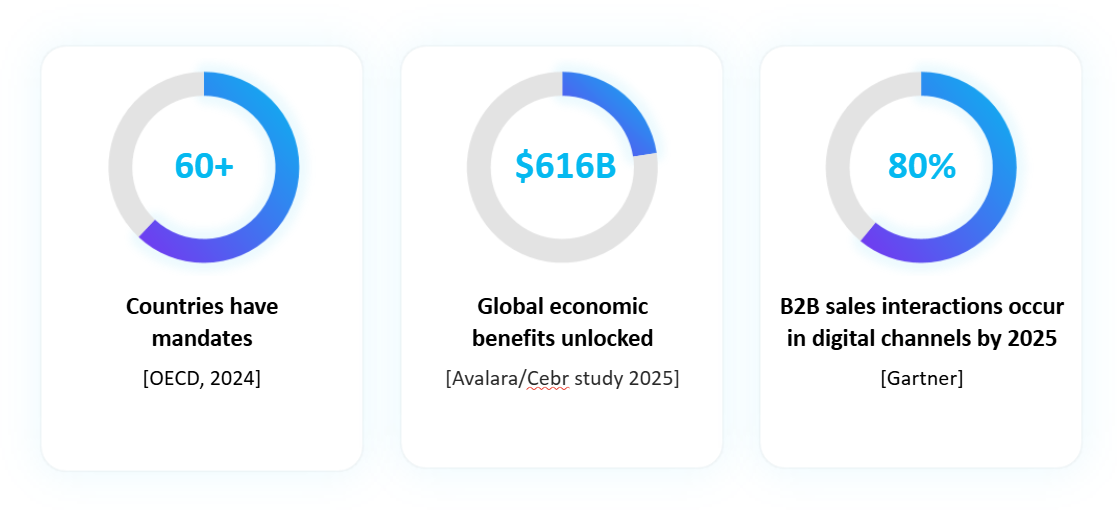
From the Digital Invoicing webinar: E-invoicing adoption is accelerating globally — not just due to mandates
“Will this actually save us money?” Yes - if you target the right bottlenecks
SMB teams ask this question all the time: Is digital invoicing really worth it, or does it simply add another tool to manage? The ROI usually shows up in two places: cost per invoice and cycle time.
So, when someone asks, “What’s the fastest path to ROI?” the answer is usually not “go fully electronic overnight.” It’s:
1. Reduce manual touchpoints,
2. Reduce exceptions,
3. Stop approval from stalling.
That’s what AP automation workflows are designed to do.
PDFs aren’t the enemy - but they’re not a standard
A lot of teams say, “We already do digital invoicing - we get PDFs.” That’s a fair instinct. But PDFs are “digital” the way a photo of a paper document is digital: it’s still not reliably structured for systems to validate and process without interpretation.
This is why structured E-Invoicing (standardized invoice data) is different from email-to-AP with attachments. Standards like Peppol BIS Billing exist to define consistent, structured formats that receiving systems can process more predictably.
In day-to-day AP terms, structured invoicing helps because:
• Required fields show up consistently (less missing PO, fewer tax surprises)
• Validation rules can run earlier (before approvals)
• Matching and routing become more reliable
• The audit trail is easier to defend
And if you’re wondering, “Do we have to move to structured e-invoices immediately?” - not necessarily. Many SMBs start by improving capture and validation for PDFs, while building supplier enablement over time for more structured formats.
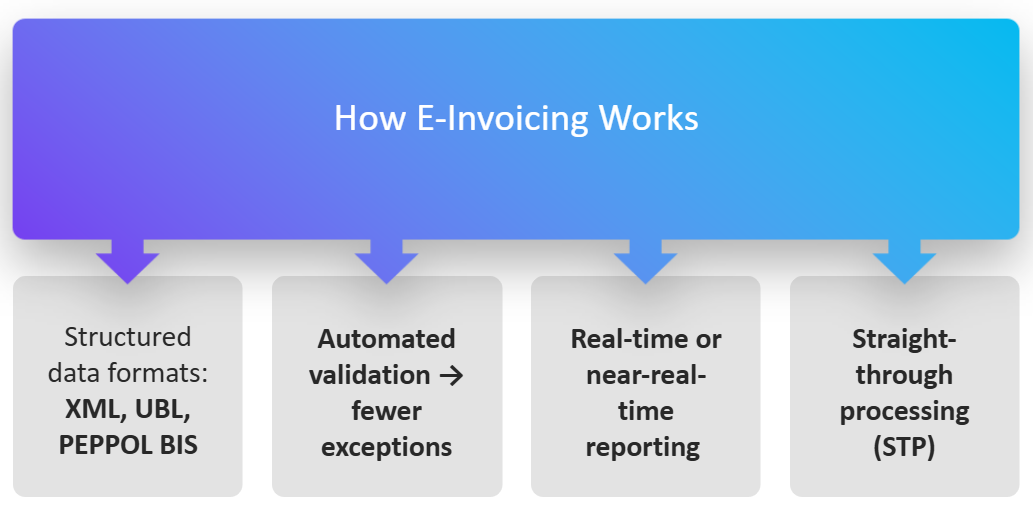
Structured invoice data enables earlier validation and fewer downstream exceptions
Fraud and duplicates: why better invoice data reduces risk
Another common question is, “Does digital invoicing actually help with fraud?” It can, because risk loves messy, manual workflows.
Business Email Compromise (BEC) is a major driver of payment fraud risk. The FBI’s IC3 2023 Internet Crime Report lists 21,489 BEC complaints with $2.9B in reported losses. The RCMP also highlights BEC as one of the most financially damaging cybercrimes impacting businesses, citing significant losses reported via the Canadian Anti-Fraud Centre.
What changes with digital invoicing isn’t that fraud disappears, it’s that you can build “speed bumps” into the workflow:
• Duplicate invoice checks before approvals
• Vendor master validation (especially bank details)
• Flagged anomalies (new remittance address, unusual amount, unfamiliar invoice pattern)
• Controlled routing and approvals (less “reply-to-this-email-to-approve”)
This is where AP Automation becomes practical risk management, not just efficiency. In practice, this means finance teams don’t need to slow down payments to reduce risk — they need cleaner data and earlier validation built into the workflow.
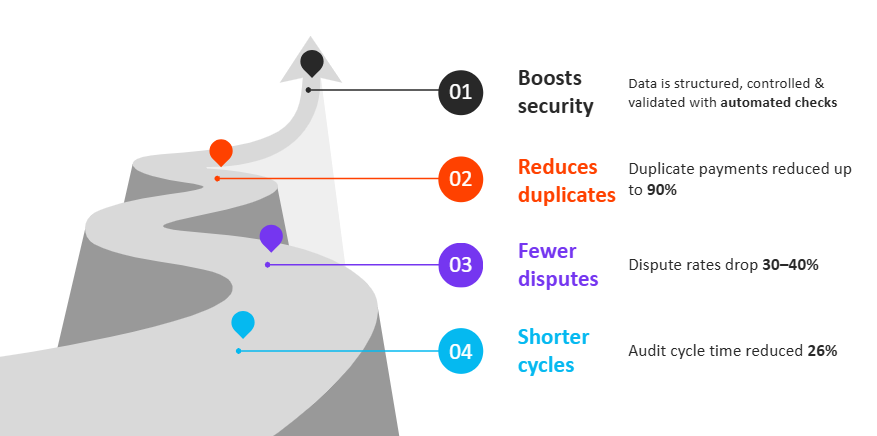
Better invoice data enables built-in controls that reduce fraud and errors earlier in the process
Where Quadient AP fits naturally in a modern workflow
When people hear “AP automation,” they often picture a giant systems project. Quadient’s approach is intentionally designed for SMB finance teams who need incremental modernization — improving control and visibility without forcing a disruptive ERP overhaul. Most SMB teams want a practical way to capture invoices consistently, validate data, route approvals, and keep an audit trail — without living in spreadsheets and email threads.
Quadient’s AP Invoice Automation positioning aligns closely to that “capture-to-approval” flow, including invoice capture, workflow routing, and ERP integration.
Here’s what that looks like in a real-world AP day:
1) Centralize intake so invoices don’t live in inboxes
Instead of invoices arriving in scattered email folders (and getting missed during PTO), you want one place where everything lands PDFs, emails, scans, and digital formats. Quadient describes invoice automation as streamlining AP from capture to approval with ERP integration.
2) Extract and validate invoice data before it hits approvals
This is the “stop bad data early” step: pull key fields (vendor, invoice number, amounts, tax, PO) and validate them so your approvers don’t waste time approving something that’s incomplete or incorrect. Quadient’s AP automation materials describe using OCR/AI-enabled capture and validation steps within AP automation workflows.
3) Route approvals based on rules (and remove the chasing)
A question AP teams ask constantly is: “How do we stop approvals from stalling?” Rules-based routing (by dollar amount, vendor, cost center, department) plus escalation and delegation are the usual answers. Quadient highlights configurable approval workflows and invoice approval automation as core capabilities.
4) Handle exceptions intentionally
Even the best process has exceptions. The goal is to surface them clearly and route them to the right person rather than burying them in email chains. That’s where workflow visibility helps teams keep moving, even when something doesn’t match cleanly.
5) Keep a clean audit trail (without extra work)
You shouldn’t have to reconstruct who approved what during an audit or a vendor dispute. A modern AP workflow keeps the “who/what/when” automatically, so you can search and export what you need when you need it.
Supplier enablement: the “make it easy” strategy
You don’t need every supplier to change overnight. The practical question SMBs ask is: “How do we get vendors on board without turning this into a fight?”
The path that works best is usually:
• Start with top suppliers by invoice volume
• Offer more than one submission path at first (so small vendors aren’t blocked)
• Explain the benefit in supplier terms: fewer disputes, faster resolution, faster payment
• Tighten standards gradually (required fields, PO rules, remittance controls)
When suppliers see fewer rejected invoices and faster approvals, adoption tends to become easier.
A simple roadmap to master digital invoicing (without a massive project)
If you want this to be manageable, don’t start with technology. Start with the friction.
1. Identify your top 3 exception reasons
Missing PO, tax issues, coding questions, duplicate invoices, approvals stuck — pick the biggest three.
2. Standardize intake and reduce “one-off” channels
Even if you still accept PDFs, get them into one controlled intake path.
3. Implement validation rules early
The earlier you catch errors, the less time you spend on rework later.
4. Fix approval flow and delegation
If approvals stall, everything stalls. Build routing rules and backup approvers.
5. Measure three numbers monthly
Cost per invoice, cycle time, and exception rate.
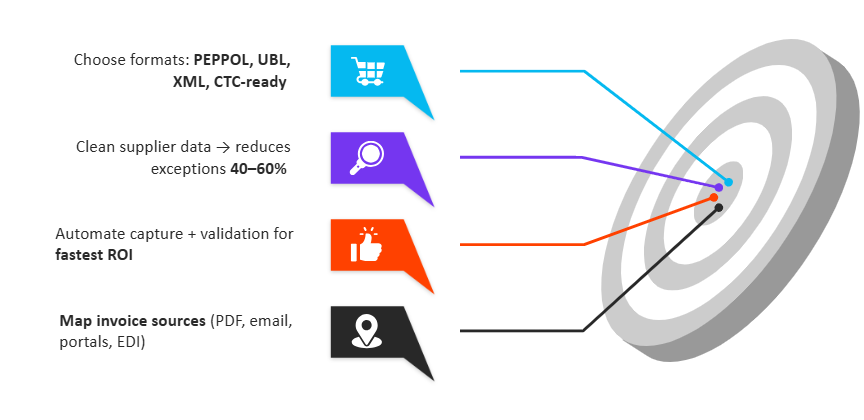
A practical, phased approach discussed during the webinar
The takeaway
Digital invoicing isn’t just a compliance box to tick. For SMB finance teams, it’s a practical way to reduce manual friction, strengthen controls, and create a smoother invoice-to-pay experience for everyone involved - AP, approvers, and suppliers.
And when you pair digital invoicing with AP modernization and the right AP Automation workflow - like centralized capture, validation, approval routing, and ERP-connected processing, you’re not only preparing for what mandates may require. You’re building an AP function that’s faster, calmer, and easier to defend.
Prefer to explore on your own?
Watch the Digital Invoicing webinar replay to see how finance teams are approaching digital invoicing as a practical AP performance upgrade.
Want to talk through your own process?
Or, if you’re actively evaluating improvements to your invoice-to-pay process, connect with our team to review your current workflow, discuss common exception patterns, and determine whether Quadient’s AP automation solutions align with your needs.