


















How do you automate accounts payable?
March 5, 2026
4 Minutes
Short answer: You can automate accounts payable (AP) by digitizing invoices, extracting data with optical character recognition (OCR) technology and artificial intelligence (AI), matching invoices to purchase orders (POs) or receipts, routing approvals (and reminders) automatically, and syncing approved invoices to your ERP.
What is AP automation?
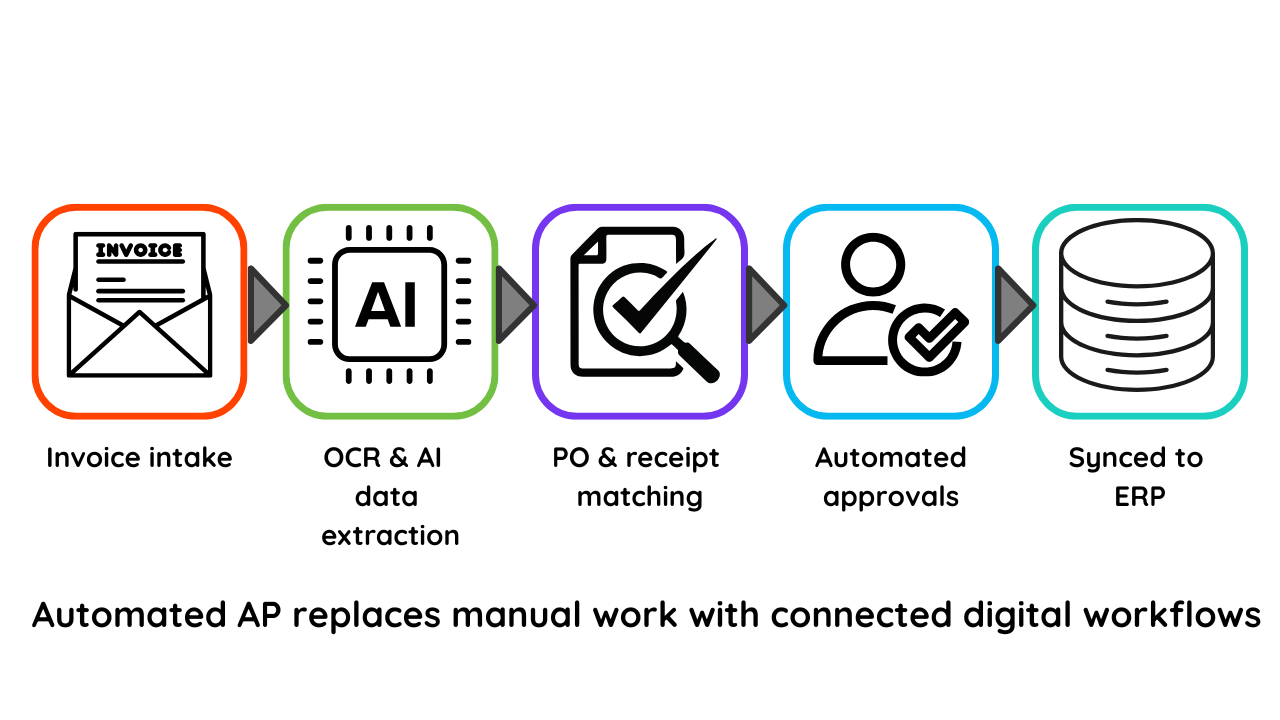
Accounts Payable automation covers the use of software to capture, validate, route, match, and store invoices in an electronic way. It speeds up processing, reduces manual tasks for financial teams, all while improving accuracy.
Automating accounts payable (AP) replaces manual, paper-based invoice management with faster, connected, digital workflows. AP automation software, such as Quadient Accounts Payable Automation, captures invoices electronically, extracts key data, matches documents, routes approvals, and provides greater visibility across the entire invoice cycle.
What AP automation actually does
AP automation gets rid of repetitive tasks that slow down finance teams. Instead of keying invoices by hand or chasing approvals, automation tools:
Capture invoices from email, portals, scanners, or EDI.
Read invoice data with the use of OCR technology and/or AI.
Validate invoice details like amounts, vendor information, as well as tax, then automatically match invoices to purchase orders or goods receipts.
Automatically routes invoices to the right approvers.
Sync approved invoices with your ERP for payment.
Provide dashboards to track processing time, exceptions, and bottlenecks.
Create an audit trail for compliance.
Discover how Quadient AP Automation works and book a free demo to see the platform in action.
The steps to automate accounts payable
1. Start by digitizing invoice capture
The first step is to collect all invoices, PDFs, emails, scans, and XML into a centralized system instead of inboxes or paper folders.
2. Extract and validate invoice data
OCR and AI can extract key fields, including vendor name, invoice number, currency, tax, PO number, and line items.
Thorough checks verify:
Missing or incorrect fields
Duplicate invoices
Formatting errors
Amount or tax discrepancies
3. Match invoices automatically
Quadient AP Automation supports both:
2-way matching: invoice ↔ PO
3-way matching: invoice ↔ PO ↔ goods receipt
This ensures accuracy, prevents overbilling, and routes exceptions directly to procurement or AP.
4. Automate approval workflows
Manual approvals slow everything down. Automation fixes this with:
Configurable routing based on cost center or amount
Mobile approvals
Automatic reminders and escalations
This reduces delays and stops invoices from sitting unnoticed in inboxes.
5. Sync payment-ready invoices to your ERP
Approved invoices sync directly to ERP systems such as NetSuite, Sage Intacct, Microsoft Dynamics, or QuickBooks. This drasically reduces data entry and ensures clean payment runs.
6. Track performance in real time
Dashboards show:
Pending approvals
Processing time by user
Exceptions
Duplicate or risky invoices
Spend by vendor
This improves forecasting and decision-making.
What you need to automate AP
Requirement | What it means | How AP automation helps |
Central invoice intake | All invoices are collected in one place | Quadient AP offers email, portal, scanned, and digital capture |
Data extraction | Converting PDFs to usable fields | OCR and AI reduce manual data entry |
Validation rules | Ensuring accuracy | Duplicate checks, PO matching, and tax validation |
Approval workflows | Routing invoices for sign-off | Custom workflows, mobile approvals, and reminders |
ERP integration | Syncing invoices into financial systems | Prebuilt integrations reduce IT effort |
Security and compliance | Audit trails and permissions | Tracks every action for governance |
Why automate accounts payable?
1. Reduce invoice processing costs
Manual invoice processing can typically cost $15-$20 per invoice. With AP automation, organizations often lower that to $5 or less—a 60–80% reduction—by eliminating manual data entry and paper handling.
2. Improve speed and cash flow visibility
Quadient AP can speed invoice processing up to 9× faster, cutting approval cycles from days to minutes. This helps capture early payment discounts and improves cash flow forecasting.
3. Reduce errors and fraud risk
AI validation catches:
Duplicate invoices
Invalid vendor details
Suspicious or unusual amounts
Incorrect or missing coding
This strengthens financial controls and reduces the risk of overpayments and fraud.
4. Strengthen supplier relationships
Faster, more predictable processing reduces supplier queries, prevents late payments, and improves communication. Vendors get clearer visibility into invoice status, which builds trust.
5. Free your AP team for higher-value work
Automation removes repetitive tasks, allowing teams to focus on vendor management, analytics, and compliance instead of typing invoices or sending reminders.
Conclusion
Automating accounts payable is one of the quickest ways to cut processing costs, reduce errors, and speed up approvals. With Quadient AP Automation, businesses shift from manual tasks to streamlined digital workflows that are accurate, transparent, and easy to manage.
Explore Quadient AP Automation and book a free demo to see it in action.
Frequently Asked Questions
Does AP automation work with my ERP?
Yes. Quadient AP Automation integrates with major ERPs, including NetSuite, Microsoft Dynamics, Sage Intacct, QuickBooks, and others.
Do I need IT resources to deploy AP automation?
Cloud-based AP automation typically requires reduced IT involvement, although ERP integrations, user access, and workflow setup may involve light IT or admin support.
Can AP automation handle PO and non-PO invoices?
Yes. PO invoices use matching rules (2-way or 3-way), while non-PO invoices route directly for coding and approval.
What about compliance and audits?
AP automation creates a digital audit trail, enforces approval rules, and provides secure document storage, making audits faster and more accurate.
How long does it take to automate an AP process?
Most organizations have AP automation running within weeks, especially with cloud tools and prebuilt ERP integrations.
Related Content
Découvrez les plus récents articles, guides, études de cas et actualités du secteur pour garder une longueur d’avance sur l’évolution des attentes des clients, les technologies émergentes et les tendances du marché.

Which accounts payable automation trends will matter most in 2026?
Discover the AP automation trends that will matter most in 2026, including touchless invoice processing, AI-powered workflows, digital payments, real-time reporting, and stronger fraud prevention.
Quadient AP vs. AvidXchange
Compare Quadient AP and AvidXchange to see which AP automation platform offers stronger visibility, multi entity support, and unified workflows. Learn how Quadient AP simplifies invoices, POs, approvals, and payments in one system.
Quadient AP vs. MineralTree
See how Quadient Accounts Payable compares to MineralTree for workflow automation, visibility, and multi-entity management. Quadient AP offers stronger controls and scalable automation for complex operations, while MineralTree fits smaller teams with simple workflows. Explore the difference and book a free demo.