


















What is accounts payable automation?
September 28, 2026
Short answer: Accounts payable automation is software that runs the invoice process as a digital workflow instead of a manual one. It captures invoices, reads their data, matches them to purchase orders, routes them for approval, and records each step in an audit trail. Its purpose is to reduce manual invoice handling, data entry, and errors, speed up approvals, and give finance clearer visibility over spend.
The accounts payable (AP) process is how a business receives, checks, approves, and pays supplier invoices. Accounts payable automation is the technology that runs that process in a more automated way. This article defines what it is, how it works, and how to evaluate it.
It covers:
What accounts payable automation replaces
How the automated invoice lifecycle works, step by step
The core features and benefits of the technology
How AP automation connects to ERP and other systems
The top features to look for in AP automation software
What does accounts payable automation replace?
Accounts payable automation replaces the manual steps necessary to manage invoices: typing data by hand, chasing approvals over email, matching invoices to purchase orders on a spreadsheet, and filing documents for audits. Accounts payable automation software (such as Quadient's account payable automation platform) turns a stack of disconnected tasks into one connected workflow. You can read our guide to accounts payable automation to learn more.
Finance teams without accounts payable automation usually still rely heavily on manual processing, such as manually entering data from invoices into the accounting system, chasing approvers or scheduling the invoice for payment. Accounts payable automation reduces these manual steps and the risk of errors that comes with them.
Step | Manual AP | Automated AP |
Invoice capture | Email inboxes, paper, shared drives | Central digital intake from email, portals, and scans |
Coding | Typed in by hand | GL coding suggested from history |
Matching | Manual PO lookups | Two- and three-way matching |
Approvals | Chased over email | Rules-based routing with reminders |
Visibility | Hard to track status | Real-time dashboards |
Audit trail | Rebuilt at audit time | Logged automatically on every action |
What does the AP automation lifecycle look like?
AP automation moves each invoice through a defined sequence: receipt, capture, coding, matching, approval, payment readiness, and recording. The point is that the same path runs every time, with software handling the routine and flagging the rest.
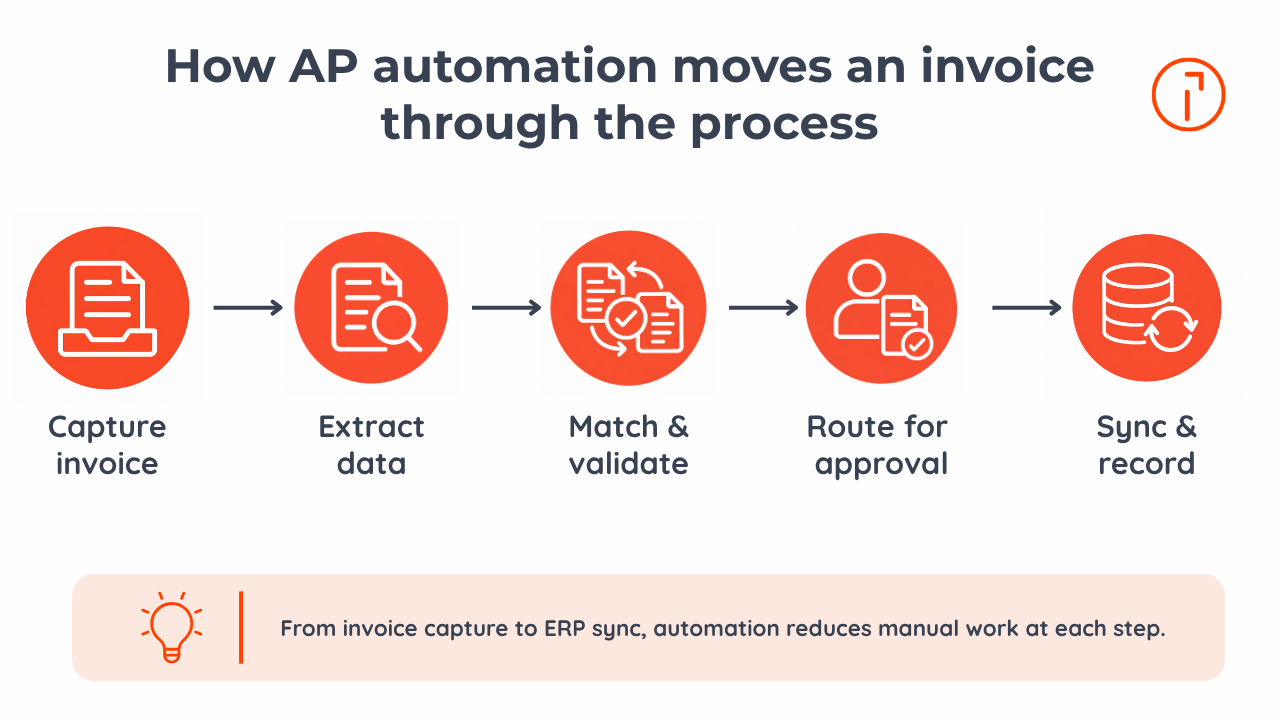
Invoice capture. The system pulls invoices from email, supplier portals, PDFs, scans, and EDI, so nothing sits in a personal inbox.
Data extraction. It reads the vendor, invoice number, line items, PO number, due date, and amount. This turns the invoice into structured data that can move through the automated workflow.
GL coding. The system suggests the appropriate general ledger (GL) account for the invoice based on past transactions.
Purchase order matching. The system compares the invoice to its PO (two-way matching) or to the PO and the goods-receipt record (three-way matching) to confirm you're paying for what you ordered and received.
Approval. The invoice approval workflow routes each invoice by rules, such as amount, vendor, department, with exception handling sending mismatches to the right person.
Payment readiness. Approved invoices are queued for payment approval, which can help finance teams capture available early-payment discounts.
Recording. The invoice syncs to the ERP and the audit trail logs who did what, and when.
Accounts payable automation doesn't make AP disappear. It makes the routine invisible so your team spends its time on exceptions, controls, and suppliers, not data entry.
Key statistic: Ardent Partners' 2026 ePayables benchmark puts the average cost to process a single invoice at $9.84 and the average cycle time at 8.2 days. Best-in-Class AP teams run 79% cheaper and 79% faster than everyone else. That gap is the baseline AP automation is built to close. (Ardent Partners, 2026)
What features and benefits define AP automation?
The core features are digital capture, data extraction, matching, approval routing, ERP sync, and reporting. The benefits, though, go well beyond cost. Automation gives finance real-time cash flow visibility, tighter controls, cleaner compliance, fewer errors, and a smoother experience for the suppliers who deal with your AP team.
Feature | What it does | Benefit beyond cost |
Invoice capture and extraction | Reads invoices across formats | Fewer errors, faster processing |
PO matching | Runs two- and three-way matching against POs and receipts | Catches overbilling and pricing errors |
Duplicate detection | Checks new invoices against past ones | Helps prevent duplicate payments |
Approval workflows | Routes and escalates by rule | Consistent controls and faster sign-off |
ERP integration | Syncs approved data to your accounting system | Accurate books, reduces rekeying |
Reporting and dashboards | Shows status, aging, exceptions | Cash flow visibility and forecasting |
Audit trail | Logs every action | Audit-ready compliance |
Those benefits map directly to the bottlenecks manual AP creates: lost invoices, approval delays, duplicate payments, and month-end scrambles to prove what happened. Automation doesn't just make AP cheaper. It makes it controllable, which is why it's often the first finance process a team automates.
How does AP automation connect to your ERP and accounting systems?
ERP integration, or the connection between your AP system and your accounting or ERP platform (NetSuite, Sage, QuickBooks, and others), syncs approved invoice data, reducing the need for rekeying. That's what keeps your books accurate and your cash flow visibility current. It also closes a common gap: when AP and the ERP are disconnected, the same invoice can be entered twice, which is exactly the kind of error duplicate-payment prevention is meant to catch. Good integration means the invoice, its coding, its approvals, and its payment status all stay consistent across systems.
What should you look for in AP automation software?
Judge AP automation software on how much of the real workflow it covers, not on a demo of one clean invoice. Look for accurate multi-format capture, GL-coding suggestions, two- and three-way matching, rules-based approvals with exception handling, direct ERP integration, and a complete audit trail. Ask about straight-through (touchless) rates on invoices like yours, how the system handles exceptions, and how suppliers submit invoices. And confirm it strengthens control and visibility, not just speed.
Quadient's AP automation helps finance teams spend 50% less time processing invoices, approve invoices 56% faster, and reach 99% invoice capture accuracy. See how it maps to your process on Quadient's AP automation solution page.
Frequently asked questions
Which accounts payable processes can be automated?
Most of the invoice lifecycle can be automated: capture, data extraction, GL coding, purchase order matching, approval routing, payment preparation, and audit-trail recording. What stays with people is judgment work, like approving payments, resolving exceptions and disputes, and managing supplier relationships.
What is the difference between AP automation and invoice automation?
Invoice automation usually refers to the front end, like capturing and approving invoices. Accounts payable automation is broader: it covers the whole payables process, from invoice receipt through matching, approval, payment readiness, ERP sync, and reporting. Invoice automation is a part of AP automation, not a synonym for it.
Can AP automation help prevent duplicate payments and errors?
Yes. The system checks for potential duplicates using invoice details such as the vendor, invoice number, and amount, and validation rules catch missing or mismatched fields.
What are the main benefits of AP automation?
Lower processing cost and faster cycle times are the obvious ones, but the durable benefits are control, visibility, accuracy, compliance, and a better supplier experience. Finance sees liabilities and cash flow in real time, controls are built into the workflow, and the audit trail is ready when auditors ask.
How should a business choose AP automation software?
Start with your actual process: invoice volume, how many arrive as PO-backed versus non-PO, which ERP you run, and where invoices currently stall. Then match those needs to capture accuracy, matching, approval rules, ERP integration, and reporting, and ask vendors for touchless rates and exception handling on invoices like yours.
Related Content
Discover the latest articles, guides, case studies, and industry updates to help you stay ahead of changing customer expectations, emerging technologies, and market trends.

What does AI actually do in accounts payable?
What AI does in accounts payable in 2026: it reads, codes, matches, and flags invoices so finance teams can focus on exceptions, approvals, and judgment.
What Reddit users say about Quadient Accounts Payable in 2026
Discover what Reddit users are saying about Quadient Accounts Payable Automation in 2026. Explore feedback on ERP integrations, OCR, approval workflows, and time savings.

How much does AP automation cost in 2026?
Learn how much AP automation costs in 2026, including pricing ranges by company size, key cost drivers, ROI factors, and FAQs.