


















What does AI actually do in accounts payable?
September 28, 2026
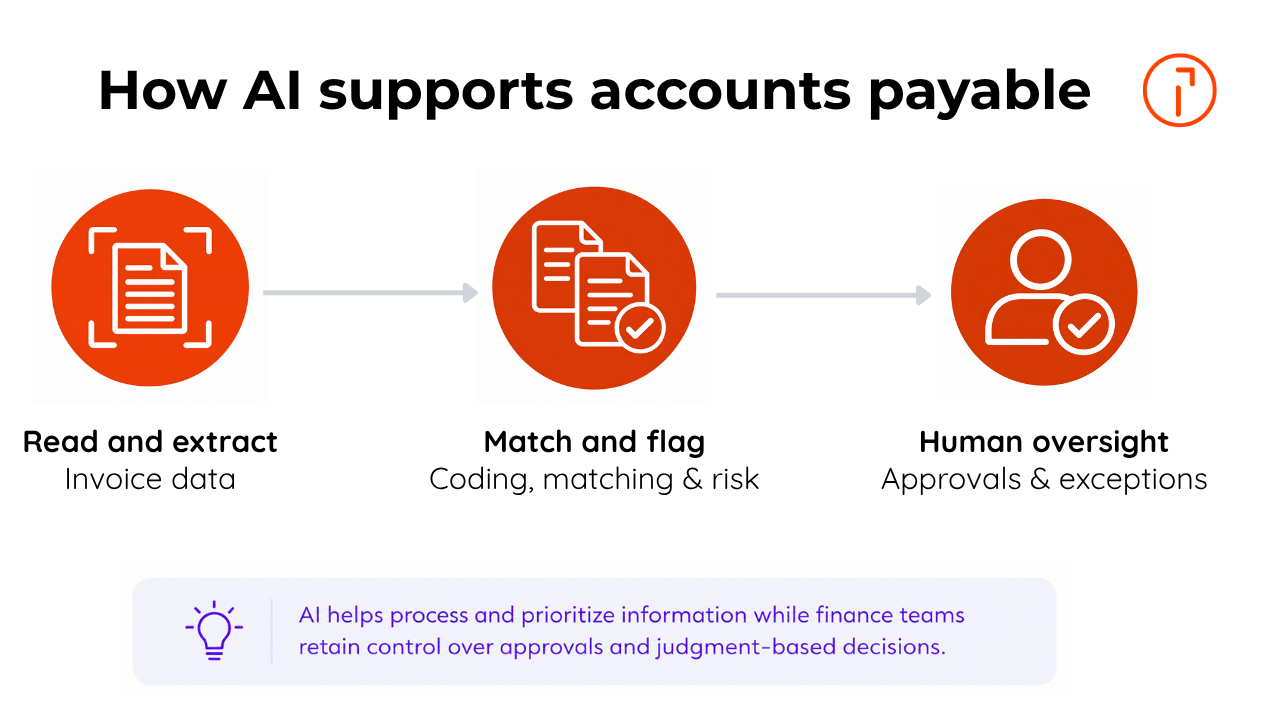
Short answer: In accounts payable, AI reads and extracts invoice data, suggests general ledger (GL) coding, matches invoices to purchase orders, and flags duplicates, errors, and fraud risk. AI handles the ambiguous, document-heavy work and supports approvals, payments, and vendor checks, while people stay responsible for controls, sign-off, and judgment-based decisions.
Accounts payable (AP) is how a business receives, checks, approves, and pays supplier invoices. This page explains what artificial intelligence (AI) does inside that process, and what it leaves to people. It covers:
Where AI fits in the accounts payable process
How AI captures invoice data, codes it, and matches it to purchase orders
How AI flags duplicate payments, fraud risk, and exceptions
What AI does not do, and where human review stays essential
What to look for in AI-enabled AP automation software
Where does AI fit in the accounts payable process?
AI sits inside AP automation (accounts payable automation), the digital workflow that replaces manual, email- and spreadsheet-based invoice handling with automated capture, routing, approval, and payment. In practice, AI and automation work together across capture, validation, matching, and exception handling, with AI adding the most value where inputs are ambiguous or unstructured.
Ordinary automation handles rules-based steps, like calculating a due date, posting an approved invoice, or routing an invoice over $50,000 to the CFO. AI earns its keep where the input is ambiguous: an unfamiliar invoice format, a vendor name that doesn't quite match, a line item that looks off. It reads, interprets, matches, and flags. It rarely decides.
How does AI capture and extract invoice data?
AI reads incoming invoices and pulls out the fields that matter. Using document intelligence built on optical character recognition (OCR) and machine learning, it ingests PDFs, scans, email attachments, and e-invoices, then extracts the supplier, invoice number, dates, line items, tax, PO number, payment terms, and totals, which reduces or eliminates much of the manual data entry.
This is the biggest single time sink AI removes. Modern capture reads varied invoice layouts without a template for each vendor, where older OCR fell down, so the goal shifts from scanning faster to extracting accurately across formats. Learn more in our guide to AI in invoice processing.
How does AI support coding, matching, and approval routing?
Once an invoice is read, AI suggests how to code it and checks it against your records. It recommends GL coding by learning from past transactions, then runs purchase order matching, comparing the invoice to its PO (two-way matching) or to the PO and the goods-receipt record (three-way matching) to confirm you're paying for what you ordered and received.
AI is most useful here when records don't line up cleanly: a missing PO reference, a partial delivery, a price that drifted. It flags these mismatches and routes them for review rather than treating every exception the same way The invoice approval workflow, routing each invoice to the right approver, is usually rules-based automation, not AI. AI's contribution is triage: sorting what looks routine from what needs a closer look.
AI doesn't run accounts payable. It reads, matches, and flags so your team can stop transcribing invoices and start managing the ones that don't fit.
How does AI catch duplicate payments, fraud risk, and exceptions?
AI watches for anomalies across the invoice stream. Duplicate-payment detection flags invoices that repeat an invoice number, amount, or vendor combination before a second payment goes out. For fraud prevention, AI surfaces unusual patterns, a sudden change in a vendor's bank details, an out-of-pattern amount, an approval conflict, for a human to verify.
Key statistic: Ardent Partners' 2026 ePayables benchmark puts the average cost to process a single invoice at $9.84 and the average cycle time at 8.2 days, while Best-in-Class AP teams run 79% cheaper and 79% faster than everyone else. (Ardent Partners, 2026)
The catch: AI can flag risks and support controls, while people retain oversight of exceptions and payment decisions. Exception handling, deciding whether a flagged invoice is a real problem, a vendor error, or a false alarm, stays with your team. Every action is recorded in the audit trail, the timestamped history of who did what that auditors and controllers rely on.
What does AI do, and what does a human still do?
Here's the split most "AI-powered AP" claims blur:
AP task | What AI does | What the human does |
Read an invoice | Extracts fields from varied invoice formats | Confirms low-confidence extractions |
Code the invoice | Suggests GL coding from history | Approves or overrides the coding |
Match to PO/receipt | Runs two- and three-way matching | Resolves mismatches and disputes |
Spot problems | Flags duplicates, errors, fraud risk | Investigates and clears exceptions |
Route for approval | Triages routine vs. uncertain | Reviews and approves the payment |
Pay the supplier | Processes scheduled payments | Approves and oversees payment runs |
Manage the vendor | Runs automated vendor checks | Owns the relationship and judgment |
AI handles document interpretation, matching, classification, and anomaly detection. People own approvals, controls, and the decisions that need judgment. That's why AI supports AP teams rather than replacing them, and why "fully touchless AP" is a target, not a starting point.
How does AI work with AP automation and ERP systems?
AI is only as useful as the workflow around it. ERP integration, the connection between your AP system and your accounting or ERP platform (NetSuite, Sage, QuickBooks, and others), lets an approved invoice post without rekeying. Follow one invoice: it arrives by email, AI extracts the data, suggests coding, and runs a three-way match. A price mismatch trips an exception; a person reviews, corrects, and approves it. The invoice then syncs to the ERP, with the whole path logged in the audit trail. AI supported several of those steps, while people kept responsibility for approvals, exceptions, and judgment-based decisions.
What should you look for in AI-enabled AP automation software?
Look past the "AI included" label and check what the AI actually does. A strong platform extracts data accurately across formats, suggests coding, runs two- and three-way matching, flags duplicates and fraud risk, and routes exceptions clearly while syncing to your ERP and keeping a complete audit trail. Ask vendors for their straight-through (touchless) rate and extraction accuracy on invoices like yours, not on a clean demo file.
Quadient's AP automation helps finance teams spend 50% less time processing invoices, approve invoices 56% faster, and reach 99% invoice capture accuracy. See how it fits your workflow on Quadient's AP automation solution page.
Frequently asked questions
What is the difference between AI and AP automation?
AP automation is the workflow that moves an invoice from receipt to payment. AI is the intelligence layer inside it that handles ambiguous inputs: reading varied invoices, suggesting coding, flagging mismatches for review, and spotting anomalies. You can automate AP with rules alone; AI reduces how often a rule breaks down and hands the invoice to a person.
How does AI extract data from invoices?
AI uses OCR and machine learning to read PDFs, scans, email attachments, and e-invoices, then pulls out the supplier, invoice number, dates, line items, tax, PO number, and totals. Unlike template-based OCR, it can handle a wide range of invoice formats, including ones it hasn't seen before.
Can AI detect duplicate invoices and fraud risk?
Yes. The system checks for potential duplicates using invoice details such as the vendor, invoice number, and amount, and surfaces unusual patterns like changed bank details or out-of-pattern amounts. It flags risk for review, while people retain oversight of payment controls and exceptions.
Does AI replace accounts payable staff?
No. AI removes repetitive data entry and first-pass checks, but people still approve payments, resolve exceptions, manage vendor relationships, and own controls. In practice, AI shifts AP work from transcription toward exception handling and judgment.
What should businesses look for in AI-enabled AP automation software?
Prioritize accurate multi-format capture, GL-coding suggestions, two- and three-way matching, duplicate and fraud detection, clean ERP integration, and a full audit trail. Ask for real touchless rates and extraction accuracy on invoices similar to yours, and confirm exceptions route clearly to the right people.
Related Content
Discover the latest articles, guides, case studies, and industry updates to help you stay ahead of changing customer expectations, emerging technologies, and market trends.

What is accounts payable automation?
What accounts payable automation is in 2026: software that captures, matches, routes, and records supplier invoices, replacing manual AP work with a controlled digital workflow.
What Reddit users say about Quadient Accounts Payable in 2026
Discover what Reddit users are saying about Quadient Accounts Payable Automation in 2026. Explore feedback on ERP integrations, OCR, approval workflows, and time savings.

How much does AP automation cost in 2026?
Learn how much AP automation costs in 2026, including pricing ranges by company size, key cost drivers, ROI factors, and FAQs.