


















Introduction
Delayed invoices slow month-end close, weaken cash forecasts and accruals, make supplier payments harder to manage, and can endanger a business. As finance teams handle higher invoice volumes and tighter compliance requirements, accounts payable (AP) automation allows finance teams to manage the full invoice lifecycle, from capture to approval to payment, in a much easier, faster way.
This article details what makes an AP automation solution a good choice in 2026 as well as the top accounts payable software options to consider.
What is accounts payable automation software?
Accounts payable automation solutions has become the easiest way for finance teams to manage invoice capture, approvals, purchase order matching, payments, reporting, and audit trails with less manual work. These platforms give AP teams one connected process for moving invoices from receipt to payment.
Why accounts payable automation matters now
For many finance leaders and CFOs, digital transformation starts with everyday pressure: closing faster, controlling spend, mitigating risk, and supporting growth without adding headcount. The cost of slow AP adds up quickly. Recent AP benchmarks show that the average AP department takes about 9.2 days to process a single invoice. The cost of manual invoice processing? $9.40 per invoice.
Accounts payable is often one of the first places to start because it's at the center of daily finance operations.
Hybrid work, global operations, and AI adoption have raised expectations for AP teams. Finance leaders need systems that can read invoices, flag errors, route approvals, and provide real-time insight.
Manual AP processes slow everything down. Invoices sit in inboxes. Approvals stall. Duplicate payments slip through. Finance teams spend too much time chasing documents and not enough time analyzing working capital. When AP data is spread across spreadsheets, email threads, and filing cabinets, CFOs can't make confident cash decisions.
That's until automation sets in. A modern AP automation platform gives each invoice a clearer path from capture to approval to payment. It also gives finance leaders a more reliable view of liabilities, bottlenecks, and upcoming payment needs, while creating a strong audit trail for compliance, tax, and internal controls.
For finance leaders, the value is simple: AP automation helps turn invoice data into something the business can see, trust, and act on.
Common AP challenges in 2026
The most common AP pain points include slow approvals, duplicate invoices, missing documents, manual data entry, limited reporting, and poor visibility into upcoming payments. Delays can lead to late payment fees, missed early payment discounts, strained supplier relationships, and a more difficult month-end close.
Duplicate invoices are another risk, especially when invoices arrive through email, mail, supplier portals, and scanned paper documents. When teams rely on manual data entry across different invoice formats, human error is more likely and can affect invoice validation, fraud prevention, and the quality of data flowing into the general ledger.
Poor visibility may be the most concerning issue for finance leaders. CFOs need to know how much cash is committed, what invoices are awaiting approval, and where the process is stuck. This is why AP automation software has become a priority for teams that need more control without adding more manual work.
How does AP automation change the role of finance teams?
AP teams used to be seen mainly as a back-office processing function. Their job was to receive invoices, enter data, chase approvals, and prepare payments. That work still matters, but their role is evolving.
Today’s finance leaders expect AP teams to support better decision-making. AP data shows where money is being spent, which departments are spending it, which suppliers are being paid late, and where process delays are occurring. This makes accounts payable a valuable source of business insight.
Automation helps make this shift possible. When software handles repetitive tasks like invoice capture, data entry, approval routing, and matching, AP professionals can spend more time reviewing exceptions, improving supplier relationships, strengthening controls, and supporting cash planning.
AP automation can turn a manual cost center into a strategic finance function.
What should finance teams look for in AP automation software?
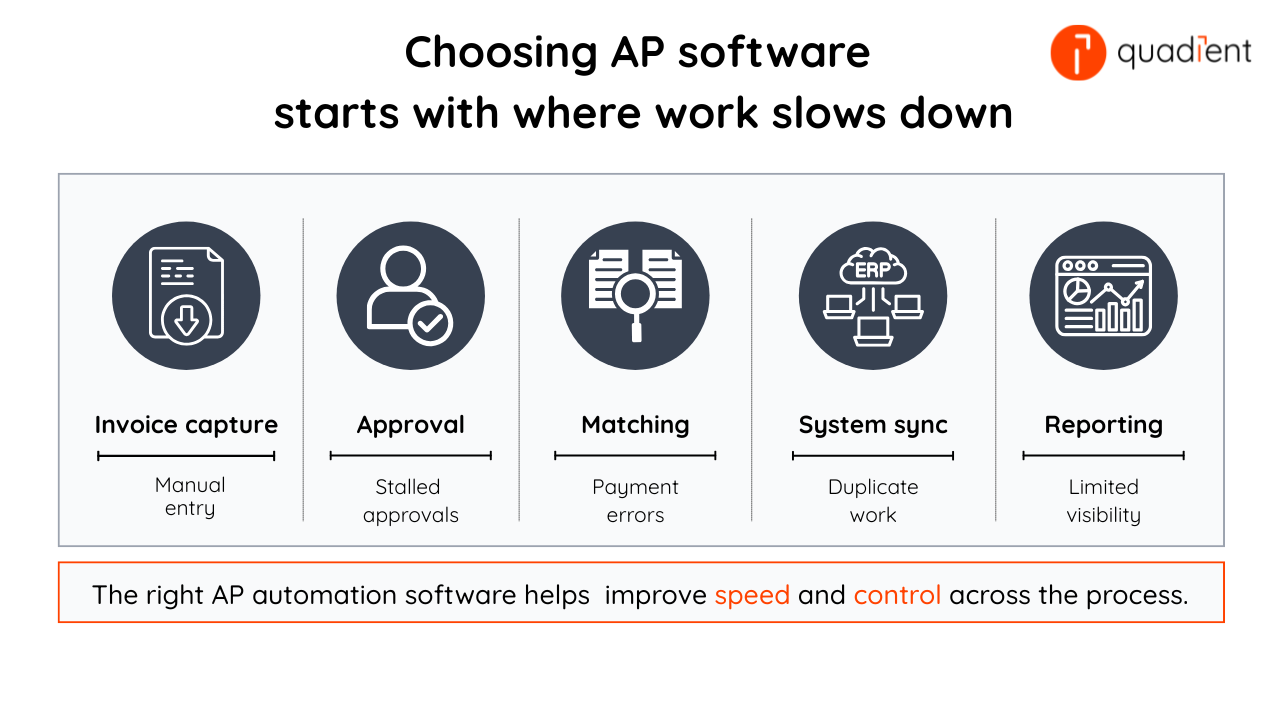
Focus on capabilities that help your team process invoices faster, reduce errors, see where things stand in real time, and maintain financial control.
AP automation software should support three core needs: visibility, accuracy, and connection to your existing systems.
Visibility and control
Look for dashboards that track invoice status, approval bottlenecks, upcoming payments, and cash flow impact. Finance teams should be able to see what is approved, what is blocked, what is due, and what needs attention next.
Automation and accuracy
Automated invoice capture uses optical character recognition and AI-powered extraction to read invoice data from PDFs, scanned documents, and various invoice formats. This reduces manual entry and helps invoices move to approval faster.
AP software should also support invoice validation, duplicate invoice detection, fraud-prevention controls, and purchase order matching, including three-way matching, to help reduce payment errors.
Workflow and approvals
Automated approvals, approval matrices, and role-based workflows route invoices to the right people based on amount, department, vendor, or business rules. This reduces delays and gives teams a clear process to follow.
Connection to your finance systems
AP automation software should connect with the ERP and accounting platforms your finance team already uses, such as NetSuite, Sage Intacct, QuickBooks Online, Microsoft Dynamics, and Xero. This keeps AP and accounting data aligned while reducing duplicate entry.
Audit trails and compliance
A full record of who reviewed, approved, changed, or paid an invoice helps finance teams support compliance, detect fraud, and conduct internal reviews.
How to choose accounts payable software
Start with the problems your team needs to solve. Look for a solution that can reduce manual invoice entry, speed approvals, prevent duplicate payments, improve reporting, connect with your ERP and accounting systems, and support audit trails.
The best option should fit your team’s invoice volume, approval structure, existing systems, and control requirements without adding complexity.
Accounts payable software solutions to consider in 2026
There is no single “best” AP automation solution for every business. Some teams need global payments, high-volume invoice processing, tight ERP alignment, or a platform that manages AP alongside expenses, corporate cards, and procurement.
Quadient Accounts Payable Automation supports these priorities with practical automation, flexible workflows, connections to ERP and accounting systems, as well as real-time visibility across invoices, approvals, and payments.
AP software | Good fit for | Typical buyer |
Quadient AP | Organizations that need practical AP automation with visibility, control, flexible workflows, and connections to ERP and accounting systems. | Finance teams that have outgrown manual AP processes and want practical, configurable automation. |
Tipalti | Organizations that need global payables, international supplier management, and multi-currency payment support. | Larger or fast-scaling businesses managing international suppliers and complex global payment needs. |
Airbase | Organizations that want AP automation as part of a wider spend management strategy, including expenses, corporate cards, and procurement. | Companies that want to manage invoices, employee expenses, card spend, and purchasing in one connected process. |
AvidXchange | Organizations that manage high-volume invoice workflows or paper-heavy AP processes. | Teams managing recurring vendor invoices across repeatable, high-volume workflows. |
Coupa | Organizations that need enterprise spend management across AP, procurement, supplier management, sourcing, and spend analytics. | Large enterprises seeking AP automation as part of a broader procurement and spend management transformation. |
NetSuite AP Automation | Organizations that want AP automation within the Oracle NetSuite environment. | Companies that use Oracle NetSuite and want AP automation within their existing ERP environment. |
When comparing AP software, look at more than the feature list. The right platform for your team should fit the way you already work. It should integrate with your ERP and accounting systems, and make daily AP tasks easier for both teams and approvers.
Quadient AP is a good choice for many mid-market organizations because the platform offers a combination of practical automation, flexible workflows, AI-powered smart features, and clear visibility, all without the complexity of a large enterprise suite.
“We’re processing invoices 50% faster with Quadient AP! Being able to see what stage our invoices are at in the approval process has helped us to become more efficient and compliant." - Lee Schofield, financial controller, Eagle Eye Solutions Limited
Conclusion
Accounts payable automation helps finance teams manage invoices with more visibility and control. From capture and approval to matching and payment preparation, the right software reduces manual work and gives teams a clear view of what needs attention.
Quadient AP helps simplify invoice processing with flexible workflows, ERP-connected automation, duplicate detection, audit trails, and real-time visibility. Finance teams can reduce manual work, strengthen controls, and manage AP without adding unnecessary complexity.
Frequently asked questions
What is accounts payable automation software?
Accounts payable automation software helps finance teams manage invoice capture, approvals, purchase order matching, payments, reporting, and audit trails with less manual work. It gives AP teams a single, connected process for moving invoices from receipt to payment, reducing errors and improving visibility across AP.
How do I compare accounts payable software?
Compare accounts payable software by looking at your invoice volume, approval workflows, ERP or accounting system, reporting needs, payment controls, and compliance requirements. Some platforms are designed for global payables or enterprise spend management, while others focus on practical AP automation for mid-market finance teams.
What is the best accounts payable automation software?
The best accounts payable automation software depends on the size of your company, the systems you use, the volume of invoices you process, and your payment needs. Teams in mid-sized businesses often need a platform that balances ease of use with ERP and accounting system integration, approval controls, reporting, and audit trails.
How does AP automation improve invoice processing?
It reduces manual data entry, routes invoices to the appropriate approvers, flags errors, and keeps invoice documents in a single system. As a result, invoices move faster, and the risk of duplicate payments, missing approvals, and data-entry errors is reduced.
Why is ERP and accounting system integration important for AP automation?
ERP and accounting system integration helps keep invoice, payment, and accounting data aligned. When AP software connects with systems such as NetSuite, Sage, QuickBooks, Microsoft Dynamics, or Xero, finance teams can reduce duplicate entry, improve accuracy, and simplify reconciliation.
How can Quadient AP help finance teams?
Quadient AP lets finance teams automate invoice processing, streamline approvals, reduce manual work, prevent duplicate payments, and gain real-time visibility into payables. It's perfect for finance teams that want practical, configurable AP automation with stronger visibility and control.
