






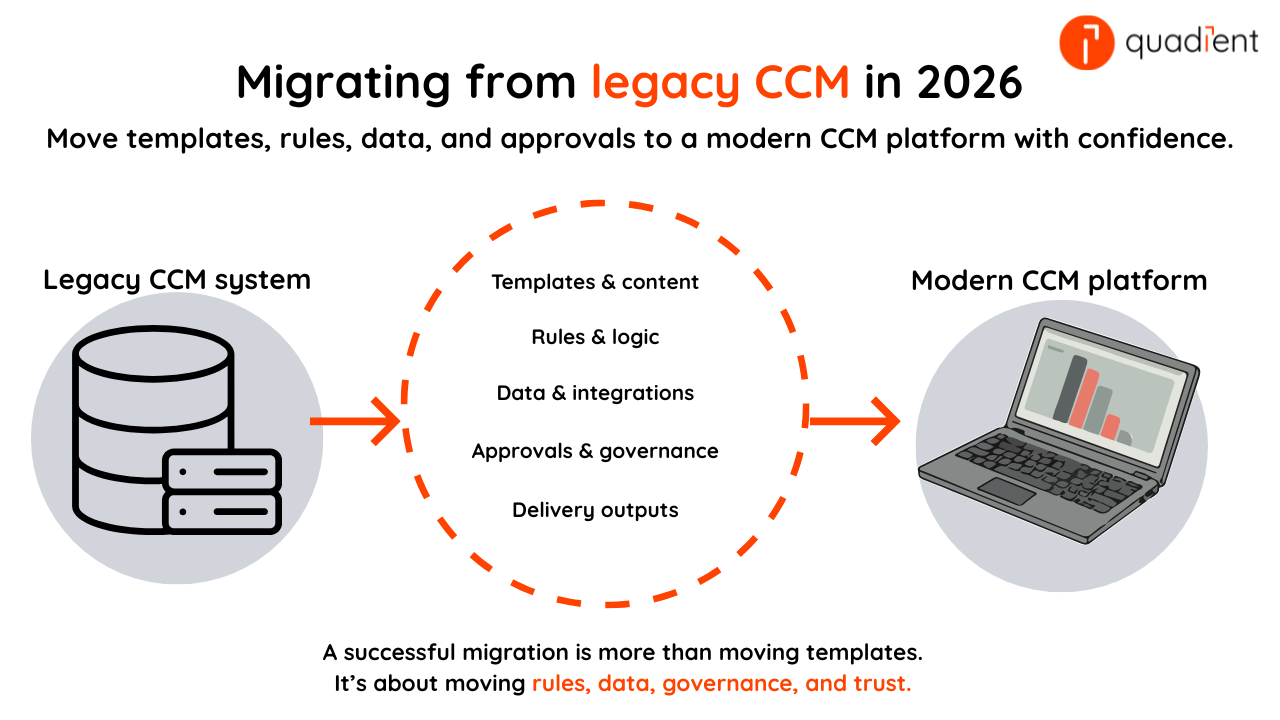
Short answer: In 2026, the safest way to migrate from a legacy CCM system is usually a phased migration (by document family) with parallel output validation for high-risk communications. Treat migration as more than “moving templates”: you must migrate rules, data mappings, approvals, and delivery outputs, then validate results before cutover.
Customer communications management (CCM) data migration in 2026 entails moving templates, content, rules, integrations, and delivery outputs from a legacy CCM platform to a modern CCM platform without breaking regulated, high-volume communications.
This guide includes:
- A 7-step migration plan
- A yes/no readiness checklist
- A comparison table of migration approaches
- A key 2026 statistic
- A pull quote
- FAQs
What does CCM data migration include in 2026?
CCM data migration is the controlled move of communication assets (templates, content blocks, business rules, data mappings, and delivery outputs) from a legacy CCM system into a target CCM platform, with validated output equivalence and governance.
In CCM, “data migration” is rarely just a database export. It usually includes:
- Templates + composition logic (print and digital variants)
- Content libraries (approved clauses, regulated text, snippets)
- Rules (eligibility, language logic, channel preference, formatting)
- Data mapping (CRM/ERP/billing fields → variables and transforms)
- Brand + accessibility standards (fonts, images, readability rules)
- Outputs + delivery (PDF/HTML/email/SMS/portals/print streams)
- Approvals + audit trails (who changed what, and when)
If you only “move files,” you typically miss the migration work that causes the most rework later: rules, mappings, and output validation.
What’s a realistic 2026 benchmark for CCM migration effort?
Quadient states that its consolidation approach can reduce analysis time by 99% and shrink migration projects by 50%+ across industries. That won’t match every environment, but it’s a useful signal: the right method and tooling can materially change effort and timeline. (quadient.com)
What are the best ways to migrate from a legacy CCM system?
Quick comparison summary (2026):
- Safest default: Phased by document family (best for complex/regulatory environments)
- Most confidence: Parallel run + output reconciliation (best for high-volume transactional comms)
- Fastest timeline (highest risk): Big-bang cutover (only for small libraries with strong tests)
- Cleanest long-term library: Rebuild / re-platform (best when templates are outdated)
- Fastest for large legacy estates: AI-assisted conversion (still requires validation)
Use this table to match your migration approach to your organisation’s risk tolerance, timeline, regulatory exposure, and template complexity.
Approach | Best for | Trade-offs | Typical outcome |
Big-bang cutover (all docs + channels at once) | Organisations with small CCM libraries, low regulatory risk, and strong automated testing | Higher outage and rollback risk if defects appear after go-live | Fastest go-live if everything is clean |
Phased by document family (bills → statements → notices) | Organisations with large CCM estates, regulated communications, or multi-channel delivery | Longer migration timeline and temporary operational overlap between systems | Safest and most common for enterprise CCM |
Parallel run + output reconciliation | Organisations managing high-volume transactional communications requiring precise output matching | Higher short-term operational cost from maintaining two environments simultaneously | Highest confidence before switching off legacy |
Rebuild / re-platform (redesign in new CCM) | Organisations replacing outdated templates and simplifying legacy communication workflows | Higher implementation effort due to redesign, testing, and template rebuilding | Cleaner library, fewer legacy constraints |
Automated extraction / conversion (AI-assisted) | Organisations with very large legacy CCM portfolios that need faster migration at scale | Requires manual validation and cleanup for complex templates and edge cases | Faster conversion + consolidation at scale (quadient.com) |
Rule of thumb: If your template library is large, AI-assisted conversion can help by extracting and reconstructing assets at scale, then leaving people to handle the exceptions and approvals. Quadient’s InspireXpress is positioned for legacy retirement and migration acceleration. (quadient.com)
What are the steps to migrate from a legacy CCM system in 2026?
Feel free to take these steps for your project plan:
- Inventory everything (not just templates). List templates, channels, rules, source systems, volumes, and owners.
- Rank documents by risk and business impact. Start with low-risk, high-volume communications where automation creates fast ROI. Move complex or regulated templates later.
- Define target architecture before conversion. Decide cloud vs hybrid vs on-prem, how data flows in, how approvals work, and what “done” means per document family. (quadient.com)
- Build a traceable data + rules map. Tie each output field to a source field plus any transformation rule. Assign an owner for every mapping.
- Migrate templates and content using repeatable methods. For large estates, prioritise approaches that reduce manual conversion time. Quadient describes AI/ML/NLP-based migration to retire legacy CCM systems and save substantial person-hours. (quadient.com)
- Validate outputs with structured comparisons. Compare legacy vs new outputs for layout, totals, conditional text, language, accessibility, and print integrity. For critical comms, run legacy and new in parallel until variance is understood.
- Cut over with rollback + monitoring. Define rollback triggers, data freeze rules, and a post-go-live monitoring window (errors, volumes, reprints, complaints).
Are you ready to migrate your legacy CCM system? (Checklist)
Before your go-live date, answer these questions as a quick gut check.
- We have a complete inventory of templates, channels, and source systems
We know which documents are regulated, audited, or legally sensitive
Every integration field has an assigned mapping owner
We have regression tests (automated or a defined manual sampling plan)
- We can run a parallel process for critical communications
We have compliance + business sign-off rules for migrated outputs
We have a rollback plan executable in hours, not days
If you mostly answered “no,” choose phased migration. It’ll be cheaper than recovering from a failed cutover.
What should improve after a CCM migration?
“Quadient Inspire has dramatically improved our control over customer communications.” — Alexandre Putini, Superintendent of Digital Channel Systems & Contact Centre, SulAmérica
In 2026, that’s the migration goal: Fewer brittle templates, fewer siloed tools, and more governed control over what gets sent.
Which Quadient tools can help with CCM migration?
If you’re evaluating platforms during migration planning, these are strong starting points:
- Quadient Inspire platform overview (CCM capabilities + deployment options)
- InspireXpress migration technology (legacy retirement and migration acceleration)
- CCM modernisation guidance (planning and simplification)
Frequently asked questions
What is the biggest risk in a legacy CCM migration?
Output defects that only appear in edge cases: Rare rules, language variants, accessibility constraints, and regulated text conditions. That’s why parallel runs and structured output comparisons matter.
Should we migrate all historical communications?
Usually not. Many teams migrate templates + rules + current-state data and keep historical outputs in a compliant archive. Migrate history only if there’s a clear requirement (regulatory access, portals, litigation).
Big-bang or phased migration in 2026—what’s safest?
Phased is safest for most enterprises, especially in regulated industries. Big-bang is mainly for smaller estates with very strong test coverage and a realistic rollback plan.
How do AI-assisted migration tools help?
They speed up analysis and conversion of large template libraries, then let teams focus on validation and exceptions. Quadient positions InspireXpress around AI-assisted legacy retirement and consolidation. (quadient.com)
What should we test before cutover?
Totals and calculations, conditional text, language fallbacks, channel formatting, accessibility, print integrity (barcodes/OMR), and data mapping accuracy—using messy real-world records, not only clean test data.
How long does a CCM migration project take?
Most CCM migrations run 8–24+ weeks depending on template count, channel scope, integration complexity, and compliance sign-offs. A phased approach often takes longer overall but lowers cutover risk. The best predictor is how many document families require strict output equivalence testing.
What tools help automate CCM migration?
Automation tools typically help with inventory extraction, template conversion, rule mapping, and output comparison. For large estates, AI-assisted migration can speed up analysis and conversion, but you still need validation and exception handling. Quadient positions InspireXpress for migration acceleration and legacy retirement. (quadient.com)
What happens to legacy CCM templates after migration?
Most teams either retire legacy templates after sign-off or keep them in a read-only archive for audit and reference. During phased projects, legacy templates often remain live for document families not yet migrated. After cutover, the goal is to avoid “split-brain” ownership by locking changes to the legacy system.
Which migration approach should we choose for our CCM system?
Most organisations choose phased migration because it lowers risk and allows teams to validate outputs incrementally. Big-bang migrations are usually best only for smaller CCM environments with limited templates and strong automated testing.