





Short answer: The best accounts payable (AP) automation tools do more than scan invoices. They should capture invoice data accurately, route approvals automatically, match invoices to POs, sync with your ERP, maintain a clear audit trail, and help prevent duplicate payments and fraud. In 2026, the best tools also improve visibility and reduce manual entry without forcing your team to rebuild its whole workflow.
Finance teams use accounts payable (AP) automation software to capture, route, approve, and record supplier invoices with less manual work. This page focuses on the features that matter most when comparing AP tools — not just vendor marketing. It covers:
- Which features are essential
- Which features matter most for control and scale
- What a strong AP platform should automate
- How to compare tools quickly
- What buyers often miss
Why do features matter so much in AP automation tools?
AP automation tools can look similar on a demo. In practice, the wrong tool creates new bottlenecks, while the right one cuts manual data entry, speeds approvals, improves visibility, and reduces payment risk. Quadient’s AP automation platform can reduce manual data entry by 83% and process invoices 9 times faster, which shows why feature depth matters more than a simple “OCR included” claim.
Key statistic: APQC says top-performing accounts payable teams take half as many days to process invoices from receipt to payment as lower-performing teams. That gap is why workflow, matching, and exception-handling features matter so much in AP automation software.
What are the must-have features in accounts payable automation software?
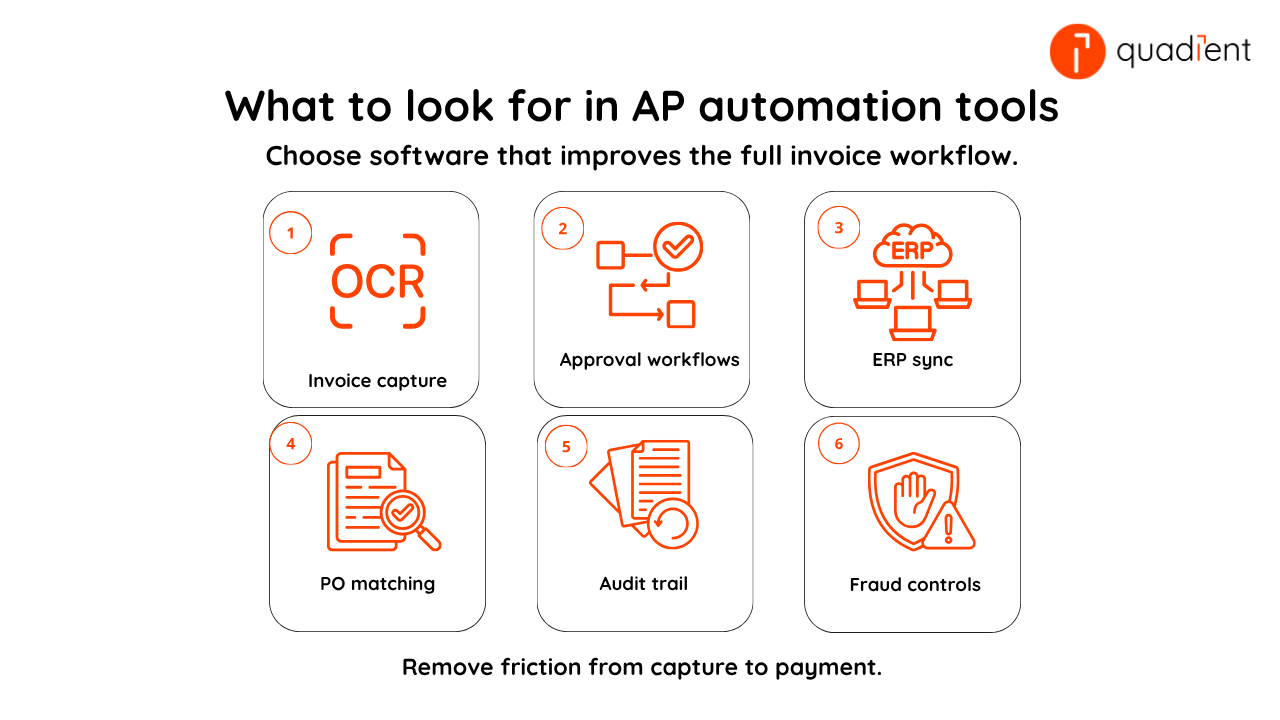
The first feature to look for is invoice capture and data extraction. Good AP software should pull invoice data from email, PDFs, scans, and other formats with high accuracy. AI-powered invoice capture can achieve up to 99% accuracy, which is a useful benchmark when evaluating AP automation tools.
The second is automated approval workflows. You want rules that route invoices by amount, supplier, department, or entity. The tool should also send reminders and escalations so invoices don’t languish in someone’s inbox.
The third is ERP and accounting integration. AP automation should not create double entry. It should sync cleanly with your ERP or accounting stack so invoice status, coding, and payment data stay current. ERP-connected automation can reduce per-transaction costs by up to 40% by eliminating manual entry and improving workflow efficiency.
The fourth is PO matching and exception handling. If your team buys against purchase orders, two-way or three-way matching is essential. It helps catch pricing errors, missing receipts, and duplicate invoices before payment goes out.
The fifth is audit trails and controls. Every approval, change, and payment action should be tracked. This matters for compliance, internal control, and faster audits.
The sixth is duplicate detection and fraud controls. AP systems should flag repeated invoice numbers, vendor mismatches, unusual payment requests, and approval conflicts. APQC says organisations should track duplicate or erroneous payments closely, which is why this is not an optional feature.
Which AP automation features matter most by use case?
Feature | Why it matters | Best for |
Invoice capture and OCR/AI | Cuts manual entry and improves speed | Organisations processing high invoice volumes |
Approval workflows | Keeps invoices moving with clear controls | Organisations with multiple approvers and structured approval workflows |
ERP/accounting sync | Prevents double entry and data gaps | Organisations with established ERP or accounting systems |
PO matching | Catches discrepancies before payment | Organisations with procurement-heavy workflows |
Audit trail | Supports compliance and clean reviews | Regulated organisations and larger finance teams |
Duplicate/fraud detection | Reduces cash leakage and risk | Organisations managing high payment volumes |
Real-time reporting | Improves cash visibility and forecasting | Finance leaders focused on cash-flow visibility |
Supplier portal or vendor tools | Reduces status emails and admin | Organisations managing large supplier networks |
The right AP automation platform balances efficiency, visibility, and control. More advanced workflows and ERP integrations can deliver greater long-term value, but they also require stronger implementation planning, process design, and change management.
What should buyers check before choosing an AP automation tool?
Use this checklist when comparing vendors:
- Confirm how invoices are captured and what accuracy rate the vendor can show.
- Check whether approvals can be customised by amount, entity, department, or supplier.
- Verify that the platform integrates with your ERP or accounting software.
Ask whether it supports PO matching and exception routing.
Review the audit trail and segregation-of-duties controls.
- Test duplicate invoice and fraud alerts.
- Look for dashboards that show liabilities, bottlenecks, and payment timing in real time.
Measure implementation effort, not just subscription price.
A simple rule helps here: don’t buy AP software just because it digitises invoices. Buy it because it removes friction from the full workflow, from capture through approval to posting and payment.
How can the right AP automation tool improve day-to-day work?
The best AP automation tools should make the whole process easier to manage, and not just digitise invoices. In practical terms, that means less manual keying, fewer approval delays, better visibility into invoice status, and stronger control over exceptions before they become payment problems. APQC’s recent guidance on reducing AP costs also points to the value of standardisation, stronger invoice accuracy controls, and checks that prevent duplicate invoices and billing errors.
A strong platform should also help finance teams work more consistently across the full invoice lifecycle. That includes invoice capture, approval routing, coding, matching, ERP synchronisation, and reporting.
Explore Quadient’s AP automation solutions to compare workflow automation, ERP integrations, approval controls, and reporting capabilities designed for modern finance teams.
Frequently asked questions
What is the most important feature in AP automation software?
Invoice capture is the starting point, but it is not enough on its own. For most finance teams, the most important combination is capture, approval workflows, ERP sync, and audit trail.
Do small businesses need advanced AP automation features?
Many small teams can start with capture, approvals, and accounting sync. But even smaller businesses benefit from audit trails and duplicate detection as invoice volume grows.
Is OCR enough for AP automation?
No. OCR helps extract invoice data, but real AP automation also includes routing, matching, controls, reporting, and system integration.
Why is ERP integration so important?
Without integration, AP teams still rekey data or reconcile across systems manually. Good integration keeps financial records accurate and improves visibility.
What features help prevent duplicate payments?
Look for duplicate invoice detection, vendor validation, approval controls, and a full audit trail. These features lower the chance of paying the same invoice twice or approving suspicious changes.