


















Introduction
The adoption of an enterprise resource planning (ERP) platform is a logical step in the growth of any organisation. Yet, estimating the full cost of deployment of a new ERP can be tricky. An ERP implementation cost calculator is a small app that can help organisations budget their ERP adoption more accurately by factoring in costs for software, hardware, training, and ongoing support.
The key takeaway is that an ERP implementation cost calculator helps organisations budget far more accurately by revealing the full scope of ERP expenses, including software, infrastructure, consulting, training, internal effort, and long‑term support. Instead of guessing or underestimating costs, finance and operations leaders can use a calculator to model realistic scenarios, reduce financial risk, and build a stronger business case before committing to a new ERP.
In this article, you'll learn what the main cost factors are, how an ERP cost calculator works, and how to use one to support your process when you're considering adopting a new ERP. If you're a CFO, a finance leader or an operations manager planning an ERP adoption or migration, this article is for you.
Why estimating ERP implementation cost matters
ERP projects are notoriously expensive. For many organisations, these projects are among their most significant technology investments. Poor cost planning can mean higher costs down the road, as well as longer timelines, or cutting scope partway through the project.
Estimating costs early, on the other hand, helps you understand the full financial commitment you're making. It can also be a smart way to build a strong business case by weighing expected benefits against total costs. When decision-makers have a clear view of the numbers, approvals become faster, and expectations are more realistic.
ERP costs vary widely. A small company using a cloud ERP may spend tens of thousands of pounds or euros. A large enterprise rolling out a customised, on-premise ERP could spend millions of pounds or euros. The ERP vendor, deployment model, number of users, and level of customisation all influence the final figure. An ERP implementation cost calculator helps translate these variables into a practical estimate tailored to your unique situation.
For finance leaders, ERP cost estimation is also a matter of governance. Once approved, ERP budgets are difficult to revise. Underestimating costs can impact cash flow forecasts, capital planning, and operational priorities for years to come.
Common ERP cost planning mistakes
The most common ERP cost planning mistakes often create long-term financial risk and higher-than-expected costs. These issues appear again and again across ERP projects:
Focusing only on software pricing: Licensing fees are only part of the picture. Implementation services, training, integrations, and internal effort often account for a much larger share of total ERP project costs.
Underestimating internal workload: ERP implementations require significant time from finance, IT, and operations teams. That time has a real cost, even if it does not appear on a vendor invoice.
Overlooking integrations: Connecting an ERP system to CRM platforms, e-commerce tools, or finance automation software increases complexity and cost. These integrations should be included from the start, not added later.
Planning only for year one: ERP systems are long-term investments. Failing to account for ongoing support, upgrades, and future growth results in budgets that appear realistic on paper but fail in practice.
Avoiding these mistakes starts with a structured approach to cost estimation and a realistic view of the total cost of ownership.
The biggest costs of the implementation of an ERP
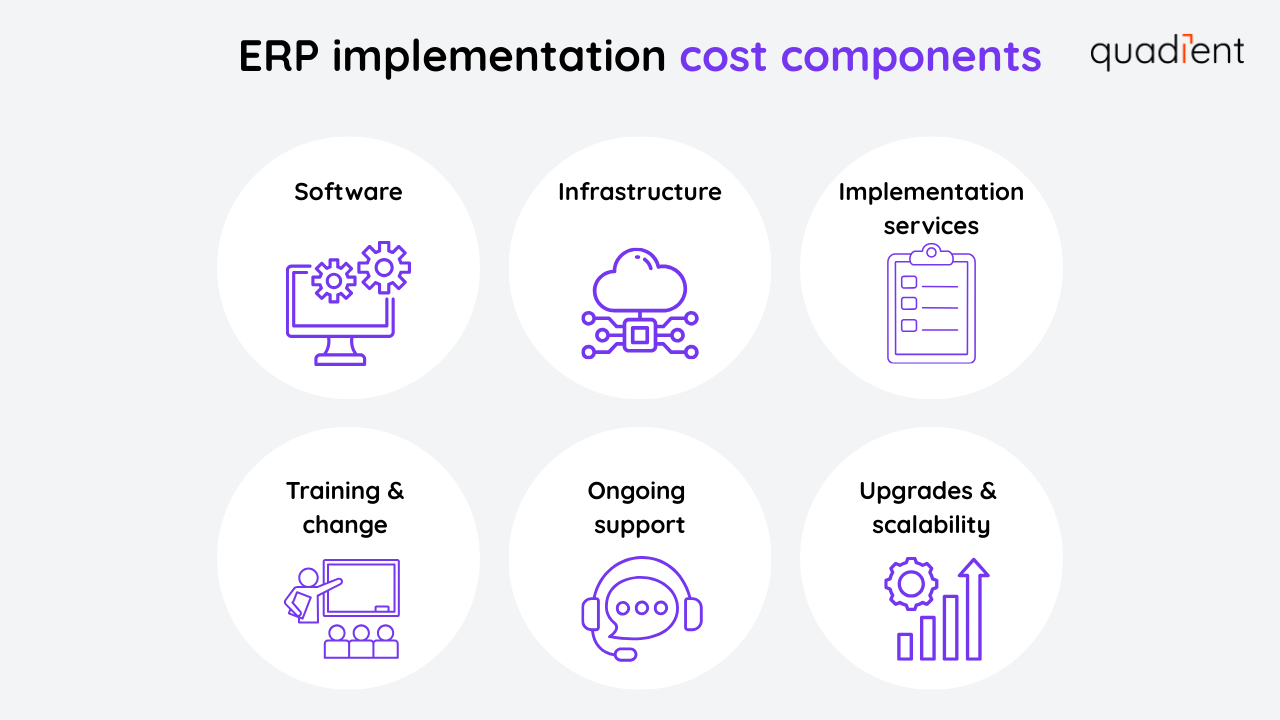
ERP implementation costs go beyond buying the software. A reliable cost calculator should capture all of the areas below to reflect the true cost of ownership.
Software licensing and subscriptions costs
This is the cost of the ERP software itself. On-premise ERP systems typically require an upfront license fee, along with annual support and maintenance charges. Cloud-based ERP platforms use subscription pricing, usually based on the number of users, modules, or transactions.
Licensing models vary by ERP vendor. Some charge per user, others by module or functionality. Costs increase as you add users, expand features, or introduce industry-specific add-ons. It’s also important to account for future growth. Underestimating user numbers early on can lead to unexpected cost increases later.
Hardware and infrastructure costs
On-premise ERP systems require servers, storage, network hardware, and backup solutions. In many cases, existing infrastructure must be upgraded to meet performance, security, or availability requirements.
With cloud ERP, infrastructure is largely managed by the vendor. But organisations may still need to budget for network upgrades, security tools, or new end-user devices to support cloud access and performance.
Implementation and consulting services
Most ERP projects rely on external expertise for system configuration, data migration, integrations, and project management. These implementation services are often one of the largest cost components, especially if you're moving to a very popular ERP system at the same time as large organisations. The pool of experts for each ERP system varies and it can become, at times, hard (or expensive) to get help.
Consulting fees also rise quickly when workflows are complex or highly customised. Integrations with systems such as CRM platforms, e-commerce tools, or finance automation solutions also add effort. Small changes in scope can have a major impact on cost, which is why clearly defining requirements early is critical.
Training and change management
Employees need time and training to use a new ERP system effectively. Costs may include formal training sessions, learning materials, and the internal time spent away from daily responsibilities.
Poor user adoption is one of the most common reasons ERP projects fail to deliver the expected ROI. Investing in training and change management reduces disruption after go-live and helps teams reach productivity faster, which means an ERP project is also a commitment from all the teams concerned.
Ongoing maintenance and support
ERP costs continue well beyond implementation. On-premise systems usually require annual maintenance fees and internal IT support. Cloud ERP subscriptions include regular updates, but advanced or premium support may carry additional costs.
These recurring expenses are a core part of the overall ERP cost and should always be included in long-term ERP budgeting.
Upgrades and scalability
As the business grows, the ERP system must scale with it. This may involve adding users, expanding modules, increasing storage, or upgrading infrastructure.
A realistic cost estimate looks beyond year one and considers growth over three to five years. Planning for scalability upfront helps avoid unplanned capital or subscription increases later.
Indirect and opportunity costs
Some ERP costs are less visible. Internal teams spend time on the project or in training rather than on their regular work. Operations may slow during testing or immediately after go-live.
These opportunity costs are difficult to quantify, unfortunately, but they should be considered nonetheless. A thorough ERP cost estimate helps avoid underestimating the project's true impact.
How the calculator works
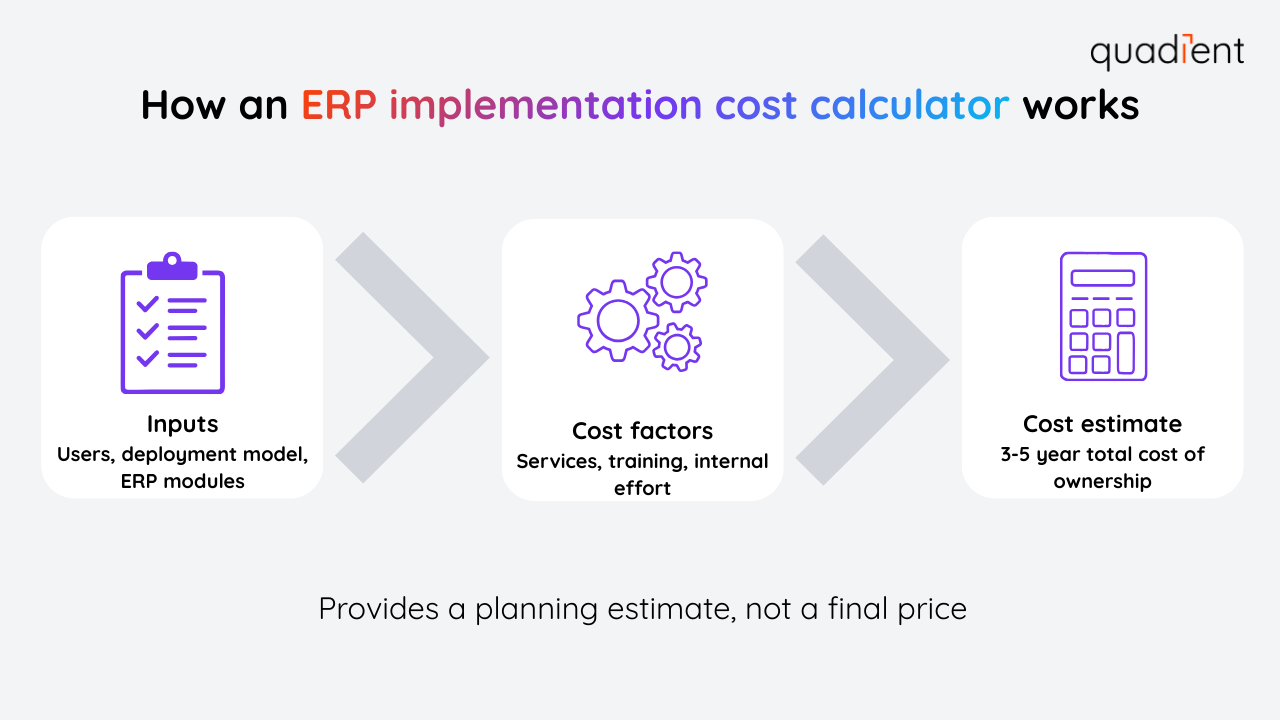
An ERP implementation cost calculator consolidates all major cost elements into a single, structured estimate. Its purpose is not to predict an exact final price, but to provide a realistic planning range that supports better decision-making.
Most calculators estimate ERP costs by combining software, infrastructure, implementation services, internal effort, training, and ongoing support into a total cost of ownership.
You begin by entering basic information about your project, including:
the number of users
the ERP deployment model (cloud or on-premise)
the modules or business functions you plan to implement
These inputs establish the baseline software and infrastructure costs.
Next, the calculator factors in implementation effort, such as:
consulting and project management
data migration
system configuration
integrations with other platforms
If your workflows are very complex or need a lot of customisation, estimated service costs will increase significantly.
You then have to account for internal costs, including:
employee time spent on testing
training and user adoption
internal project coordination
Many organisations significantly underestimate this point, even though internal effort can greatly impact overall project cost.
Finally, the calculator includes ongoing costs, such as:
annual maintenance fees
subscription renewals
support contracts
future upgrades
Many tools choose to distinguish one-time implementation costs from recurring annual costs to simplify budgeting, but it's important to consider the total cost when making a decision.
The output is an estimated cost over a defined period, often three to five years. This longer view helps finance teams compare cloud versus on-premise ERP options, evaluate affordability, and plan cash flow with greater confidence.
An ERP cost calculator does not replace vendor quotes or detailed implementation proposals. Instead, it provides a clear baseline so you can ask informed questions, challenge assumptions, and reduce the risk of costs going over budget before the project begins.
Simple example
An organisation planning a cloud ERP enters its number of users, required modules, and expected level of customisation into the calculator. It then adds estimated consulting effort, training time, and annual support costs.
The result is a single, consolidated estimate that reflects both implementation and ongoing costs, making it easier to plan budgets and compare ERP options.
Benefits of using a calculator
For finance and operations leaders, the value of a cost calculator is not precision. It’s visibility and control.
Using a cost calculator provides several clear advantages:
It creates visibility into the true cost of ERP implementation.
It helps finance teams plan cash flow and budgets more accurately.
It reduces the risk of scope creep and cost overruns.
It supports stronger business cases and executive approval.
It enables scenario planning, such as comparing vendors or deployment models.
Most importantly, it turns ERP budgeting into a structured, data-driven process instead of guesswork.
Cloud ERP vs. on-premise ERP
One of the most important decisions in ERP planning is whether to choose a cloud-based or on-premise deployment. Each option has a different cost structure, which is why a cost calculator is especially useful.
Cloud ERP systems usually have much lower upfront costs. There is no need to purchase servers or manage infrastructure, and pricing is usually subscription-based. This makes costs more predictable and spreads them over time. Cloud ERP also scales more easily as user numbers grow.
On-premise ERP systems on the other hand require higher initial investment. Software licenses, hardware, and internal IT resources add to upfront costs. Some organisations prefer this model for greater control over data, customisation, or compliance requirements.
Over the long term, total cost of ownership can vary depending on growth, support needs, and upgrade cycles. A cost calculator helps you to compare both options side by side, using consistent assumptions, so decision-makers can choose the model that best fits their financial and operational priorities.
Maximising ERP ROI with accounts payable and accounts receivable automation
Accurate cost planning is only the first step in ERP success. The real return comes from how effectively the system is used after go-live.
Many ERP business cases assume efficiency gains that never fully materialise. Manual processes remain in place, workarounds persist, and finance teams continue to spend time on repetitive tasks. This is where automation plays a critical role.
Automating accounts payable and accounts receivable is one of the fastest ways to increase ERP ROI. Manual invoice processing, approvals, and collections consume time, introduce errors, and slow cash flow. When these processes are automated, finance teams can operate faster and with greater accuracy.
Quadient’s accounts payable automation integrates directly with leading ERP platforms to streamline invoice capture, approvals, and posting. Manual data entry is reduced, approval cycles are shortened, and processing costs decline. The ERP remains the system of record, while automation handles the workflow around it.
On the receivables side, Quadient’s accounts receivable automation helps organisations get paid faster. Invoicing, reminders, and collections workflows are automated, reducing days sales outstanding and improving cash flow. Finance teams spend less time chasing payments and more time managing exceptions and relationships.
Because Quadient’s AP and AR automation solutions connect seamlessly with ERP systems such as NetSuite, SAP, and Microsoft Dynamics, they extend ERP value without adding complexity. Financial data stays aligned across systems, reporting remains accurate, and manual work is minimised.
The result is not just lower operational cost, but better adoption of the ERP itself. When finance processes run smoothly, teams trust the system, use it consistently, and realise the efficiency gains originally promised in the ERP business case.
Learn more about Quadient integrations: AP automation integrations: https://www.quadient.com/en-gb/ap-automation/integrations AR automation integrations: https://www.quadient.com/en-gb/ar-automation/integrations
Conclusion
ERP implementation is a major investment, but it does not have to be unpredictable. An ERP implementation cost calculator helps organisations plan accurately, understand the total cost of ownership, and avoid budget surprises.
By combining careful cost estimation with process automation tools like Quadient’s AP and AR solutions, businesses can not only control ERP costs but also accelerate ROI. With the right planning and the right integrations, an ERP system becomes a long-term platform for efficiency, visibility, and growth.
