


















Introduction
To understand an ERP system, imagine a city where each department uses its own roads. Accounting, inventory, HR, sales and other teams all move data on their own road, often using separate systems. Without a shared unique highway, it happens that data gets stuck in traffic, delayed or completely lost.
ERP integration is exactly a shared highway, connecting enterprise systems so data flows easily across accounting, internal business applications (e.g., inventory or human resources) and customer-facing tools (e.g., customer relationship management (CRM) or billing platforms).
The key takeaway is that ERP integration creates one unified data pathway across the business, replacing manual processes with automated, real‑time information flow that improves accuracy, efficiency and decision‑making.
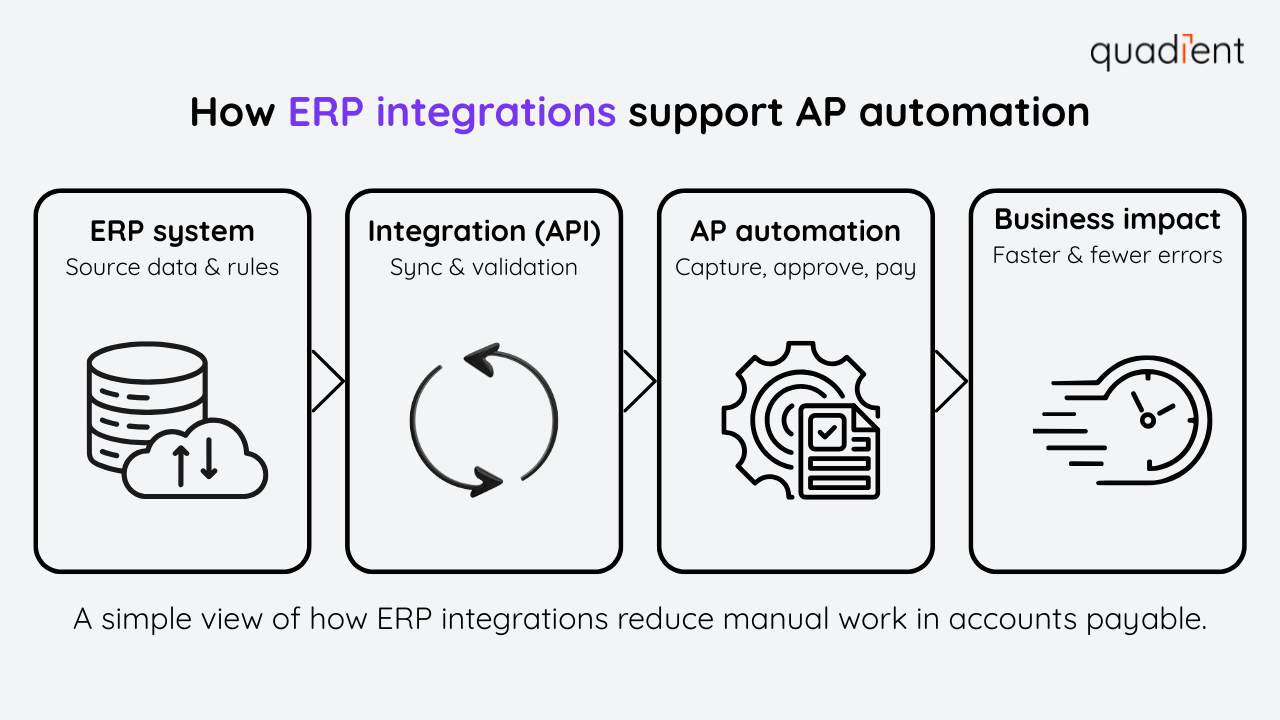
Connecting an ERP system to payment and analytics platforms, teams can reduce manual work and gain a clearer view of their operations. This article explains what ERP integration is, how it works, the benefits and risks and how accounts payable (AP) and accounts receivable (AR) automation software can support more efficient business processes.
What is ERP integration?
ERP integration refers to the process of connecting an ERP system with other platforms using connectors. This process allows for automatic data transfers and synchronisation. Instead of each business platform working in isolation, ERP integration means that the data is uniform across platforms. For example, if a customer places an order on your e-commerce website, an integrated ERP system can immediately update inventory, inform the finance module of a sale, and trigger fulfilment processes, all without manual work. ERP integration creates a unified environment in which financial, operational, and customer data are consistent across all systems. This has become a strategic part of ERP building and leads to fewer manual tasks, and the option to generate reports updated with the latest information from any platform. In turn, armed with better data, organisations can make faster (and hopefully better) decisions for their operations.
Businesses running without strong ERP integration still rely on spreadsheets, manual file uploads, and email approvals to move information between systems. For example, teams have to download an Excel file, update it to fit another platform's template, and upload it there. Orders may be delayed due to outdated inventory data, and finance teams spend hours reconciling mismatched records, which leads to burnout and loss of talent. With ERP integration, those same processes run automatically. Orders update inventory in real-time, invoices post directly to accounting, and reports reflect current activity without manual intervention. The result is a smoother, more predictable operation.

Why businesses need ERP integrations
Without integration, teams often have to re-enter the same data into multiple systems, for example, entering an invoice into both the sales system and the accounting platform. This manual duplication wastes time and increases the risk of errors. ERP integrations solve this by allowing systems to “talk” to each other. The information is entered once, and is then updated everywhere needed.
By streamlining data workflows, ERP integration eliminates silos and ensures teams work from the same accurate information. Finance can close the books faster, operations can plan proactively, and leaders gain reliable insights from a single source of truth.
ERP integration delivers different benefits across teams. Finance teams benefit from faster closes and fewer reconciliation issues because transactions flow automatically between systems. Operations teams gain real-time visibility into inventory and order status, helping them plan production and fulfillment more accurately. Sales teams avoid quoting outdated pricing or availability, while executives gain confidence that dashboards and forecasts reflect current, reliable data across the business.
How ERP integrations work
ERP integrations use secure connections to automatically share data between systems. The right approach depends on your architecture, cloud strategy, and business requirements. Most integrations rely on APIs, middleware, or cloud-based integration platforms to ensure information moves accurately and in real time.
API-based integrations
APIs allow applications to share data directly and in real time. With API-based ERP integration, systems such as CRM, eCommerce, and payment platforms exchange information automatically, enabling rapid updates to inventory, orders, and payment status. This approach is flexible, scalable, and common in cloud ERP environments.
Middleware and iPaaS solutions
Middleware and integration platform as a service (iPaaS) tools act as a central layer between systems. They manage data routing, transformation, and error handling, making it easier to connect multiple applications without custom development. These solutions are popular with growing businesses that need to manage complex integrations.
Cloud vs. on-premise integration
Cloud ERP integrations are easier to scale and maintain, with lower infrastructure overhead. On-premise integrations offer more control but require greater IT resources. Many organisations use a hybrid model, connecting legacy systems with modern cloud applications through APIs or middleware.
Regardless of the approach, integrations must protect data through encryption and access controls to ensure secure and compliant data exchange.
Choosing the right integration approach depends on your systems and priorities. API-based integrations work best for modern, cloud-based applications that require real-time updates. Middleware or iPaaS solutions are often better suited for organisations that connect many systems or manage complex data flows with limited IT resources. Hybrid approaches are common when businesses need to integrate legacy on-premise systems while gradually moving to the cloud.
Common systems that integrate with ERP software
ERP systems rarely work alone. Businesses integrate them with other software to streamline end-to-end processes and keep data consistent across teams. Common ERP integrations include:
CRM systems
CRM integrations connect sales, customer, and finance data. When a deal closes, orders and invoices can be created automatically, improving visibility, forecasting, and customer follow-up.
eCommerce platforms
Retailers integrate ERP systems with eCommerce platforms to sync inventory, orders, and payments. This prevents overselling, speeds fulfillment, and keeps financial records accurate.
AP and AR automation tools
AP and AR integrations automate invoice processing, approvals, payments, and cash application. This reduces manual entry, improves accuracy, and supports audit-ready financial reporting.
Business intelligence tools
Business intelligence platforms pull ERP data into dashboards for reporting and forecasting. Integration ensures analytics reflect current, centralised data rather than outdated exports.
Other common integrations include human resources systems, project management tools, and supply chain or warehouse management platforms. In every case, the goal is unified information flow that supports reporting, forecasting, and performance tracking.
In manufacturing, ERP integrations often connect production planning, inventory management, and procurement systems. This ensures materials are available when needed and production schedules adjust automatically based on demand.
In healthcare, ERP systems integrate with billing and patient management applications to support accurate invoicing while maintaining compliance with UK and EU data protection requirements. Automation reduces errors and improves audit readiness.
In retail, ERP integrations support omnichannel operations by synchronising online and in-store inventory, orders, and payments in real time. This improves fulfilment speed and customer experience.
Key benefits of ERP integrations
When implemented effectively, ERP integration delivers measurable business value.
Centralized data and reporting
Connected systems create a single source of truth, making reporting faster, more accurate, and easier to trust. Teams spend less time reconciling numbers and more time analysing results.
Reduced manual entry and errors
Automated data flows eliminate repetitive tasks and reduce errors across accounting and operations. This improves data quality and lowers operational risk.
Improved collaboration across departments
Shared data gives teams full visibility into sales, inventory, and finance. This strengthens coordination, accountability, and cross-functional alignment.
Greater efficiency and productivity
Streamlined workflows reduce delays and free teams to focus on higher-value work. Over time, these efficiency gains support scalability without proportional increases in headcount.
Challenges and risks of ERP integration
While ERP integration offers clear benefits, it also comes with challenges that require careful planning.
Choosing the wrong tools or vendors
Not all systems integrate easily. Poor vendor fit or limited integration capabilities can lead to performance issues, higher costs, and lower ROI.
Data security and compliance risks
Integrations increase data movement, which can introduce security risks if controls are weak. Organisations must protect sensitive information and comply with regulatory requirements, including UK GDPR and EU GDPR. Strong audit trails, role-based access, and encryption are essential.
ERP integrations also help automate compliance-related controls. Integrated systems create consistent audit trails, enforce role-based access, and reduce reliance on manual file transfers. This makes it easier to demonstrate compliance during audits and reduces the risk of errors or unauthorised access due to disconnected systems.
Implementation delays and hidden costs
Custom integrations can take longer and cost more than expected. Clear requirements, thorough testing, and stakeholder alignment help reduce delays and unexpected expenses.
How AP automation improves ERP integration
AP automation strengthens ERP integrations by addressing financial workflows that ERPs often handle inefficiently.
Filling ERP functionality gaps
Most ERP systems lack advanced invoice capture, approval routing, and electronic payment capabilities. AP automation tools extend ERP functionality while keeping the ERP as the system of record.
Reducing manual workload and invoice errors
Integrated AP software automates invoice capture, approvals, and posting, reducing manual entry and errors. This leads to faster, more accurate payables cycles.
For example, when a supplier invoice arrives, AP automation software captures the data, routes it for approval, and posts it directly to the ERP once approved. Payment is initiated electronically, and the ERP is automatically updated when funds are sent. This end-to-end process reduces delays, improves accuracy, and gives finance teams real-time visibility into liabilities and cash flow.
Automating payments and reconciliation
AP automation enables electronic, real-time payments via networks such as Faster Payments, Bacs, CHAPS, and SEPA. Integrated workflows automatically update payment status and reconcile invoices in the ERP, improving cash visibility and simplifying month-end close.
For organizations operating across the UK and Ireland, ERP and AP integration also helps manage multi-currency payments, FX exposure, and regulatory requirements. Cross-border payments introduce additional complexity due to currency conversion, timing differences, and regional compliance requirements.
Integrated ERP and payment systems help address these challenges by implementing appropriate controls, maintaining consistent records across regions, and supporting payment networks commonly used in the UK and Ireland.
How to plan and implement ERP integrations
Successful ERP integration starts with clear planning and realistic expectations.
Identify goals and pain points
Define what you want to improve, such as faster close cycles, fewer manual entries, or better visibility into operations. Clear goals guide tool selection and success metrics.
Map data flows and choose integration tools
Determine which systems need to connect and what data must flow between them. Choose APIs, middleware, or iPaaS solutions based on complexity, scale, and internal resources.
Test, train, and maintain
Test integrations thoroughly to ensure accuracy and security. Train users on new workflows, then monitor performance over time. Integration should be treated as an ongoing capability, not a one-time project.
Common ERP integration mistakes include underestimating the effort required to clean and standardise data, overlooking user training, and treating integration as a one-time project. Successful organisations plan for ongoing monitoring and refinement as systems change and business needs evolve.
Examples of ERP integrations in action
Most modern ERP platforms support broad integration ecosystems.
SAP Business One integrates with manufacturing, finance, and AP automation tools to reduce manual entry and support audit-ready workflows.
Microsoft Dynamics 365 connects with CRM, analytics, collaboration, and payment systems, enabling real-time data sharing across the enterprise.
NetSuite and Sage Intacct act as central hubs for finance teams, integrating with AP automation, analytics, and industry-specific applications to support growth and compliance.
Across platforms, integrations extend ERP capabilities and increase long-term value.
The future of ERP integrations
ERP integrations are becoming more intelligent, automated, and industry-specific.
AI-driven integrations will help detect risks, automate exception handling, and improve decision-making. Deeper automation will support real-time payments, multi-currency transactions, and cross-border compliance, especially for UK and Ireland operations.
Industry-specific integration ecosystems will continue to grow, with tailored solutions for manufacturing, healthcare, and retail. The result is an ERP system that not only connects applications but also actively coordinates business processes.
Conclusion
ERP integrations are a long-term investment in efficiency and digital transformation. By connecting systems and automating data flows, businesses improve accuracy, compliance, and decision-making across accounting, operations, and customer processes.
With the right approach and tools, ERP integration turns disconnected applications into a unified ecosystem, enabling teams to work faster, smarter, and with greater confidence as the business scales.
Successful ERP integration is visible in everyday operations. Teams spend less time reconciling data, reporting becomes faster and more reliable, and decisions are made with confidence. As businesses grow, integrated systems provide the foundation needed to scale without adding unnecessary complexity.
