


















Introduction
Running NetSuite (the ERP solution developed by Oracle) without any integration is like trying to finish a puzzle with half the pieces missing. The picture is there, you can have a sense of what it represents, but key details (in this metaphor: sales activity, delivering updates or payment status) are missing or incomplete. NetSuite integrations can complete the puzzle and bring your business information together by connecting your tools and automatically syncing data between them.
The key takeaway is that NetSuite becomes dramatically more powerful when it’s integrated with the right tools; reducing manual work, speeding up AP processes, improving accuracy and giving finance teams real‑time, reliable visibility into spend, cash flow and performance. With strong integrations, NetSuite functions as a scalable financial system of record that supports automation, control and better decision‑making as organisations grow.
This article details the main integration options, the key benefits of connected workflows and how to set them up.
What is a NetSuite integration?
In simple terms, a NetSuite integration is a connection that lets NetSuite automatically share data with another application. Instead of re-entering information or importing spreadsheets, integrations use standard connectors or APIs to sync data automatically. This helps businesses keep the tools they rely on, such as customer relationship management (CRM), e-commerce platforms or payment systems, while NetSuite remains the source of truth.
It’s also very important for accounts payable (AP) automation, where invoice, approval and payment data need to move quickly and accurately between systems to reduce delays and error risks.
Common NetSuite integration use cases
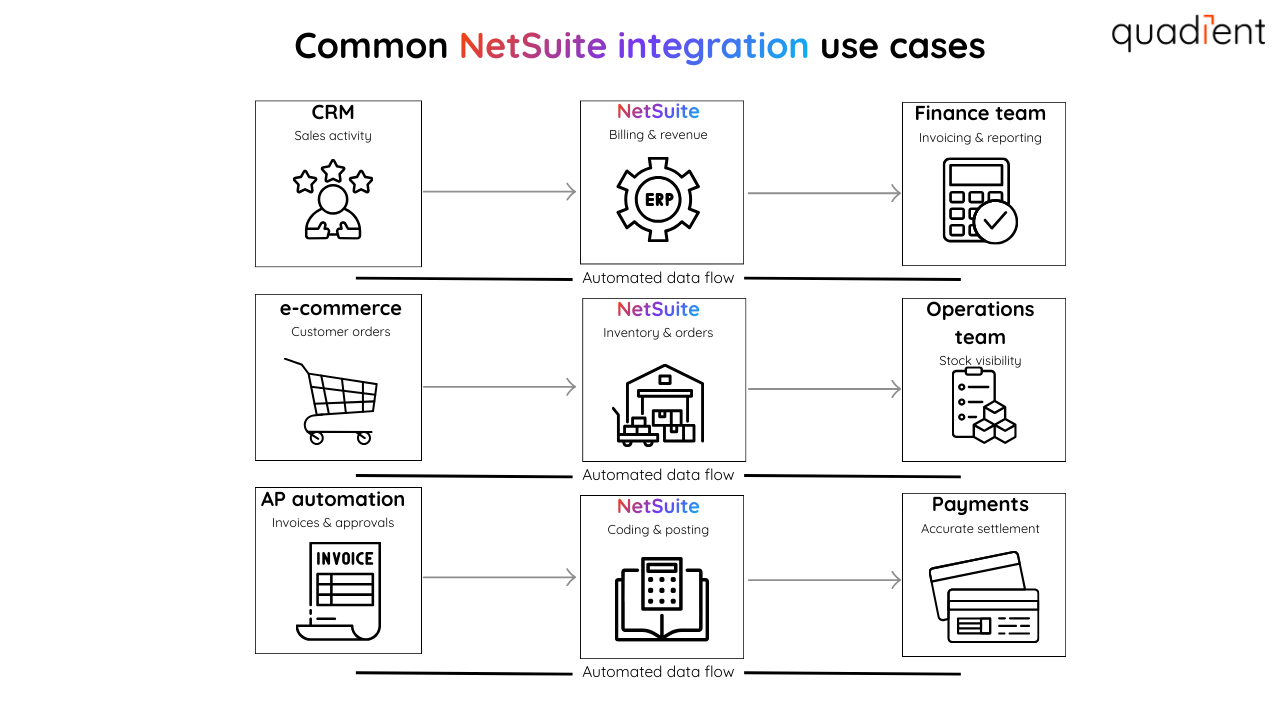
Most NetSuite users choose to connect their systems because business processes are much more efficient when they operate with clean data in the right place, at the right time. In mid-to-large organisations, NetSuite integrations often support high-volume workflows, where even small errors can cause major delays and frustrations. Here are a few common examples of popular integrations:
CRM + NetSuite (sales to finance): Sync customer records, pricing and closed-won deal details from your CRM into NetSuite to support faster billing and cleaner revenue tracking, as well as better visibility.
E-commerce + NetSuite (orders and inventory): Keep online orders, returns, customer data and inventory levels aligned to avoid stock issues and manual updates.
Delivery/3PL + NetSuite (fulfilment visibility): Sync fulfilment status and tracking numbers into NetSuite so teams can see what delivered, what’s delayed and what’s next.
Payments + NetSuite (transaction accuracy): Sync payment and settlement details to reduce significantly reconciliation work and support a faster, more precise financial close every month (and a happier team).
AP automation + NetSuite (invoice-to-pay): Move invoice data, approvals, coding and payment status between systems to reduce rework, errors and speed up processing.
The right use case depends on your business requirements, transaction volume and how many platform applications your teams rely on across departments.
The different options for NetSuite integration
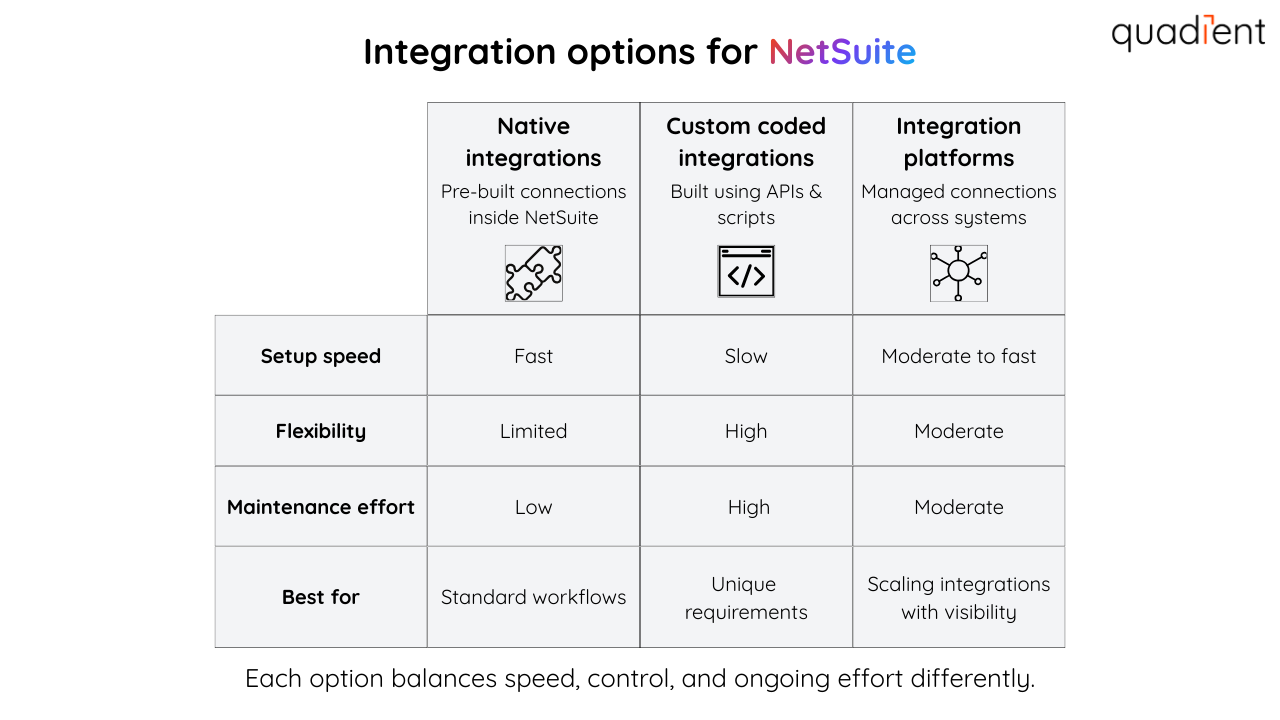
When integrating with NetSuite, you can choose from several different approaches. The right option depends on your use case, technical resources and long-term needs.
Option 1: Native integration
NetSuite offers prebuilt connectors and integrations for popular business tools, including CRM platforms like Salesforce and common finance, sales and operations systems. This is usually the quickest way to connect apps and start syncing data with minimal set-up. It’s a strong fit for standard processes where speed and simplicity matter most.
Option 2: Coded integration
Customised integrations are built by developers using NetSuite APIs and scripts. They give you more control and flexibility. But they take longer to implement and often require ongoing maintenance as systems change. This option works well when you have unique requirements and reliable technical support to maintain it.
Option 3: Integration platforms
Third-party integration platforms make it easier to connect NetSuite to multiple applications without heavy coding. Many provide ready-made workflows, field mapping and scheduling tools to automate data sync and reduce manual work, which is helpful for teams that need speed, scale and visibility. They also make it easier to manage integrations over time as requirements evolve.
NetSuite integration best practices (and common mistakes to avoid)
A successful NetSuite integration ensures the data stays accurate, workflows stay predictable and ownership is clear when something breaks.
Best practices
Define a single source of truth: Decide where “master” data lives (like vendors, customers, item records and GL codes). If two systems create records simultaneously, you risk duplicates and reporting issues. Also, in case there's a mistake at some point, you should be clear as to which platform holds the "true" data.
Assign an owner for each integration: This helps ensure failures don’t get missed during close or peak processing periods and tracking advancement.
Start with the process, not the technology: Map your workflow first (order-to-cash, procure-to-pay etc.), then choose the integration approach that supports it.
Standardise field mapping early: Confirm how key fields translate between systems, especially IDs, dates, currencies, tax fields and approval statuses.
Plan for exceptions: Every integration needs error handling. What happens if an invoice is missing a PO number? Or a delivery update fails to sync? What's the contingency plan?
Roll out in phases: Instead of integrating everything at once, start with one workflow, one business unit or one region and expand from there.
Common mistakes to avoid
Over-customising too early: It’s tempting to build complex workflows on day one, but too much customisation can make maintenance harder over time.
Not testing real scenarios: Make sure testing includes real-world exceptions, not just “perfect” transactions.
Leaving integration ownership unclear: Teams need to know who monitors failures, who fixes mapping issues and who updates workflows when processes change.
Forgetting about future changes: NetSuite updates, new subsidiaries, new approval rules and system upgrades can all affect integrations, even if they worked fine at launch.
Strong integrations should be built for the long term. The goal is to build a complete system that supports your business growth without adding new manual work every time something changes. Scaling should be thought about from the start.
What you gain from NetSuite integrations
NetSuite integrations help reduce friction across departments by keeping data aligned and processes moving.
Improved communication: Automatically share updates like order status, delivering info and inventory changes
Greater accuracy: Reduce manual data entry and keep customer and financial data consistent
Faster workflow: Speed up approvals, processing and handoffs with real-time syncing
Smoother processes: Get end-to-end visibility across supply chain, fulfilment and transactions
Smarter decision-making: Combine data across systems for clearer reporting and better insights
How to set up a NetSuite integrations
While every organisation has different systems and requirements, most NetSuite integrations follow a similar set of steps.
Prepare NetSuite: Set up users, roles and permissions for integration access. Make sure integrations use role-based access controls so only the right users can view, sync or change sensitive financial data.
Pick your tools: Choose SuiteTalk Web Services, SuiteCloud, SuiteScript or an integration platform based on your requirements.
Connect systems: Securely link NetSuite with the apps you need (CRM, e-commerce, delivery, payments, AP automation).
Map your data: Match fields between systems and define workflows to keep records and transactions accurate.
Test and launch: Validate everything in testing, then roll out to production with confidence.
Monitor and maintain: Track sync performance, troubleshoot issues and adjust as processes change.
Conclusion
NetSuite integrations help businesses streamline processes, improve data accuracy and make faster decisions with real-time visibility across systems. Whether you use native connectors, custom APIs or integration platforms, the goal is the same: reduce manual work and keep teams aligned.
If AP efficiency is a priority, Quadient helps automate invoice processing and approvals inside NetSuite. Learn more about Quadient’s AP automation integration for NetSuite: https://www.quadient.com/en/ap-automation/integrations/netsuite
Want to learn more about integrations? Please check related articles:
