


















Introduction
Microsoft Dynamics 365 (commonly called D365) is a cloud-based enterprise resource planning (ERP) and customer relationship management (CRM) platform. From its inception, D365 has been built to help organisations streamline their finance, operations, sales, human resources and supply chain operations and manage them inside a single shared system. As with most ERP systems, integrations have become the most important way to get better value out of the platform. Indeed, connecting D365 with other Microsoft tools, third-party software, as well as finance automation solutions can significantly reduce data silos. Integrations can also automate workflows and improve real-time visibility. In short, D365 is fantastic, but you're only getting part of the value unless you add powerful integrations.
The key takeaway is that Microsoft Dynamics 365 delivers far greater value when it’s integrated with the other systems organisations rely on; breaking down data silos, automating manual workflows, improving real‑time visibility and strengthening financial and operational control. With the right integrations, D365 becomes a fully connected, scalable ecosystem that supports faster decisions, stronger compliance and more efficient growth across finance, operations and customer‑facing teams.
This guide covers the main types of D365 integrations, their expected benefits, the most common pitfalls and several best practices for practical implementation.
What Is Microsoft Dynamics 365?
D365, is composed of multiple cloud-based applications which together combine ERP and CRM capabilities into a single platform. Some of these core apps include Dynamics 365 Finance, Supply Chain Management, Sales, Customer Service, Field Service, Project Operations and Human Resources.
Together, all these apps can help organisations manage their financial, operational and customer processes in one place. D365 also helps organisations to centralise data and supports secure access from anywhere. The platform automatically updates with the latest data and has been built to scale as your business grows, making it a great choice for organisations around the world. It's no surprise that the platform is already used by more than 50, 000 companies in the world (Microsoft, 2025).
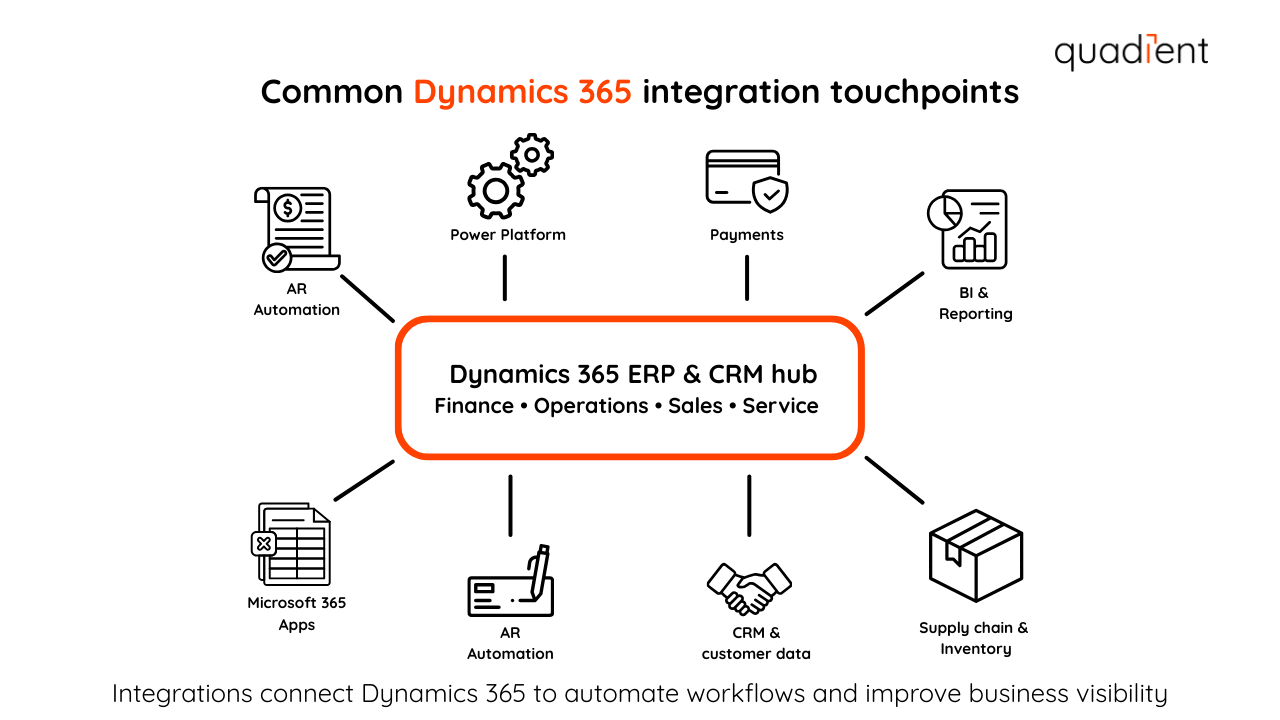
Why are Dynamics 365 integrations so essential?
When systems aren’t connected, the risk of information getting stuck in silos is very high. Employees end up re-entering the same data in multiple places regularly, which means reporting becomes slower and less reliable. Over time, this creates more errors, more manual work and puts more pressure on teams.
Integrating D365 with internal modules and third-party systems can solve these issues by creating a more connected, automated environment. Data can flow more smoothly across departments and platforms. Automation reduces repetitive tasks and teams can act on real-time information instead of chasing updates or entering manual data (with a high risk of error). The result is stronger control, better compliance and a system that can scale without adding complexity. Without powerful integrations, your ERP is blind to what happens inside your other systems.
Which companies benefit most from Dynamics 365 integrations?
D365 integrations can benefit the whole organisation, but they’re especially valuable for the teams responsible for performance, governance and long-term scalability. Chief financial officers (CFOs) benefit from a clearer visibility into their financial and operational data, which allows them to make better strategic decisions. Integrated systems reduce the need for manual reconciliations. They also support more accurate cash flow forecasting and can strengthen financial controls. When automation is added to workflows like accounts payable (AP) and accounts receivable (AR), finance teams can close (much) faster. Finance IT managers benefit from a more stable, scalable system architecture. Integrations reduce the need for workarounds and one-off scripts, while improving consistency across systems. By using supported tools such as the Power Platform and certified connectors, IT teams can improve security and streamline upgrades. They can also roll out new automation initiatives without creating unnecessary technical debt (technical debt being the long-term maintenance and upgrade burden caused by short-term fixes, i.e., things you don't invest in now that will bite you later). ERP project leads benefit from tighter implementation scope. They also see smoother adoption when integrations match real workflows. When integrations match real workflows, users are less likely to resist the new system or default to manual processes. Integrations also help ensure ERP projects deliver measurable outcomes by connecting finance, operations and customer data into a single co-ordinated ecosystem. At this point it should become evident that integrations aren't optional. They are a key strategic lever to get more out of your D365 platform.
What you should know about Microsoft Dynamics 365 integration
To put it simply, D365 integration means connecting different platforms (or modules or apps) together. Whether they're developed by Microsoft or by third-parties, the core objective is the same: to let information move automatically between systems. Instead of relying on spreadsheets, emails or worse (manual data entry), teams can work from consistent, up to date data across departments.
Microsoft Dataverse plays a central role by providing a shared data layer for D365 applications. The Microsoft Power Platform includes Power Automate, Power BI, Power Apps and Power Pages. These tools support workflow automation, reporting and low-code app development. Together, these technologies make it easier to integrate D365 across both Microsoft and non-Microsoft environments without sacrificing security or control.
Types of Dynamics 365 integrations
D365 supports several integration types, depending on what your organisation needs to connect and automate.
Microsoft 365 app integrations connect D365 with everyday tools like Outlook, Teams, Excel and SharePoint. This makes it easier for teams to collaborate, update records and work with D365 data without constantly switching between systems.
Power Platform integrations help teams automate workflows, build dashboards and extend D365 functionality through low-code tools. Power Automate supports process automation, Power BI delivers real-time reporting and Power Apps enables customised apps that align with business needs.
Third-party software integrations connect D365 to non-Microsoft systems such as Salesforce, Shopify, HubSpot or SAP. This is especially useful for organisations with hybrid tech stacks or industry-specific solutions.
Native D365 module integrations connect D365 apps and add-ons within the platform, such as Finance, Supply Chain Management, Sales, Customer Service, Project Operations, Field Service and Human Resources. These integrations support shared data, better visibility and smoother processes across departments.
Common types of Dynamics 365 integrations
The table below summarises common Dynamics 365 integrations, how they’re typically used and the value they deliver.
Integration type | What it connects | Typical use cases | Business value |
|---|---|---|---|
Microsoft 365 app integrations | Outlook, Teams, Excel, SharePoint | Track emails and meetings, collaborate on records, bulk data updates, document management | Improves adoption, reduces manual entry, keeps Dynamics data current |
Power Platform integrations | Power Automate, Power BI, Power Apps, Power Pages | Workflow automation, real-time dashboards, customised apps, external portals | Accelerates automation, improves visibility, extends D365 without heavy customisation |
Third-party software integrations | Salesforce, Shopify, HubSpot, SAP, payroll systems | Data synchronisation, order and invoice exchange, customer and vendor updates | Supports mixed technology environments and cross-system workflows |
Finance automation integrations | AP and AR automation platforms | Invoice capture, approvals, payments, cash application, collections | Speeds up processing, improves accuracy, strengthens cash flow control |
Native D365 module integrations | Finance, Supply Chain Management, Sales, Customer Service, HR | Shared processes and data across departments | Creates a single source of truth, eliminates internal data silos |
Benefits of integrating Dynamics 365
When D365 is integrated properly, finance and operations teams can work from a single, reliable source of truth. This improves consistency across reporting and day-to-day workflows. With centralised data, teams can report faster, respond quicker and make decisions with more confidence.
Integrations also unlock automation across workflows like approvals, reconciliations and reporting. This reduces manual effort, minimises delays and frees finance and IT teams to focus on higher-value work. Because D365 runs on Microsoft Azure, integrations can support stronger security and compliance. Features like role-based access, audit trails and governance controls help reduce risk and improve oversight.
As business needs change, integrated D365 environments can scale more easily. New apps, modules and automation tools can be added without disrupting core processes and unified data makes analytics more useful across finance, operations and customer activity.
Integration planning and readiness checklist
Before implementing Dynamics 365 integrations, it's helpful to confirm the organisation is prepared across data, processes and ownership.
Define integration goals
Identify the different processes you want to improve first, such as processing invoices, payments, collections or reporting activities.
Align with the finance, IT and operations teams on the priority
Set success metrics, such as cycle time reduction, accuracy improvements or better cash visibility
Assess data readiness
Review vendor, customer and chart of accounts data for consistency
Identify duplicate, incomplete or outdated records
Establish clear source-of-truth and data ownership rules
Evaluate integration scope and tools
Confirm which systems need to connect to D365
Decide whether built-in tools, the Power Platform or third-party connectors are needed
Ensure external finance automation tools support secure, API-based integration
Plan governance and ownership
Assign ownership for integration support and maintenance
Define approval workflows, exception handling and escalation paths
Document key mappings and dependencies
Prepare users and processes
Communicate how workflows will change with automation
Train teams on the updated processes
Plan post-go-live monitoring and improvement cycles
Design for scale and compliance
Confirm audit trails, role-based access and security controls are in place
Plan for growth and future integration needs
Avoid over-customisation that could slow down upgrades later
How to set up effective Dynamics 365 integrations
Most D365 integrations start with Microsoft’s built-in capabilities. Power Automate and Dataverse can support common workflows, like syncing finance data into Power BI dashboards or automating approvals directly inside D365. Many organisations also connect D365 to AP and AR automation tools to streamline invoice processing, payments, cash application, as well as collections. These solutions integrate with D365 to automatically exchange vendor, customer, invoice and payment data, reducing manual entry and improving cash flow visibility and control. For some of the more complex use cases, Azure Logic Apps can also connect cloud and on-premise systems. The platform can also manage multi-step workflows at scale. And when connecting external systems, certified connectors and trusted integration partners can help support security, authentication and long-term maintainability.
Common Dynamics 365 integration challenges
Integrations are most successful when they’re planned carefully. A few common issues tend to cause problems during roll-out or long-term maintenance.
Poor data mapping: When field structures don’t match or ownership rules aren’t defined, integrations can create duplicate records, missing fields or unreliable reporting. It's important to clearly map and validate data early in the project.
Insufficient testing and documentation: Integrations that aren’t tested against real-world scenarios may break after go-live, especially during system updates. Good documentation matters for long-term support and troubleshooting.
Over-customisation: Heavy customised logic may solve short-term needs, but it often complicates upgrades and increases maintenance effort. Keeping integrations as standard as possible makes long-term improvement easier.
Low user adoption and change management gaps: If users aren’t trained or don’t trust automated workflows, they may avoid the system or create manual workarounds, reducing the return on investment.
Real-world examples of Dynamics 365 integrations
D365 integrations support high-impact use cases across finance, operations and customer-facing teams by helping data move automatically between systems.
Finance: Accounts payable automation AP automation integrations capture invoices, route approvals and sync vendor and payment data with D365. This reduces manual processing, improves accuracy and helps teams pay vendors faster and more consistently.
Finance: Accounts receivable automation AR automation speeds cash application, reduces manual matching and enables automated customer reminders. This helps finance teams maintain better visibility into outstanding balances and collections.
Sales: CRM and collaboration tools Dynamics 365 CRM integrates with Outlook and Teams, so sales teams can more easily track emails, meetings and customer interactions. This supports smoother follow-ups and stronger pipeline visibility.
Operations: Inventory and supply chain systems Integrations keep orders, inventory updates and fulfilment data synchronised in real time. This helps reduce inventory shortages and supports better planning across supply chain workflows.
HR: Payroll and HR systems Payroll integrations improve consistency between employee data and finance reporting, reducing manual reconciliation and strengthening reporting accuracy.
Maximise the value of Microsoft Dynamics 365 integrations
The best integrations aren’t “set it and forget it.” As new tools are added and business needs evolve, connected systems should be reviewed regularly. This helps prevent the creation of new silos and broken workflows over time. Ongoing optimisation helps ensure integrations stay reliable, scalable and aligned with finance and operations priorities.
Conclusion
D365 integrations are essential for organisations that want to centralise data, automate workflows and improve control across finance and operations. By connecting ERP, CRM and specialised automation tools, businesses can reduce manual effort, gain real-time visibility and build a more scalable foundation for growth.
Looking to streamline finance and operations with Dynamics 365? Explore integration solutions, including AP and AR automation from Quadient, to improve efficiency, visibility and control across your business.
Want to learn more about integrations? Please check related articles: