


















Introduction
Sage Intacct is an accounting platform endorsed by the AICPA (American Institute of Certified Public Accountants) and developed by The Sage Group, headquartered in Newcastle, UK. Sage Intacct gives finance teams real-time visibility and the structure of an enterprise resource planning (ERP) system as organisations grow.
On its own, Sage Intacct is already a powerful platform. But when it’s connected to the right tools, it can become much more effective. Integrations can drastically reduce manual work, support faster accounts payable (AP) processes and keep financial reporting easy, accurate and always up to date.
The key takeaway is that Sage Intacct becomes dramatically more powerful when it’s integrated with the right tools-reducing manual work, speeding up AP processes, improving accuracy and giving finance teams real‑time, reliable visibility into spend, cash flow and performance. With strong integrations, Sage Intacct functions as a scalable financial system of record that supports automation, control and better decision‑making as organisations grow.
This guide explains which integrations matter the most, the benefits they can deliver and how to get started quickly.
What is Sage Intacct?
Short answer: Sage Intacct is a cloud-based accounting and financial ERP system that serves as the system of record for finance.
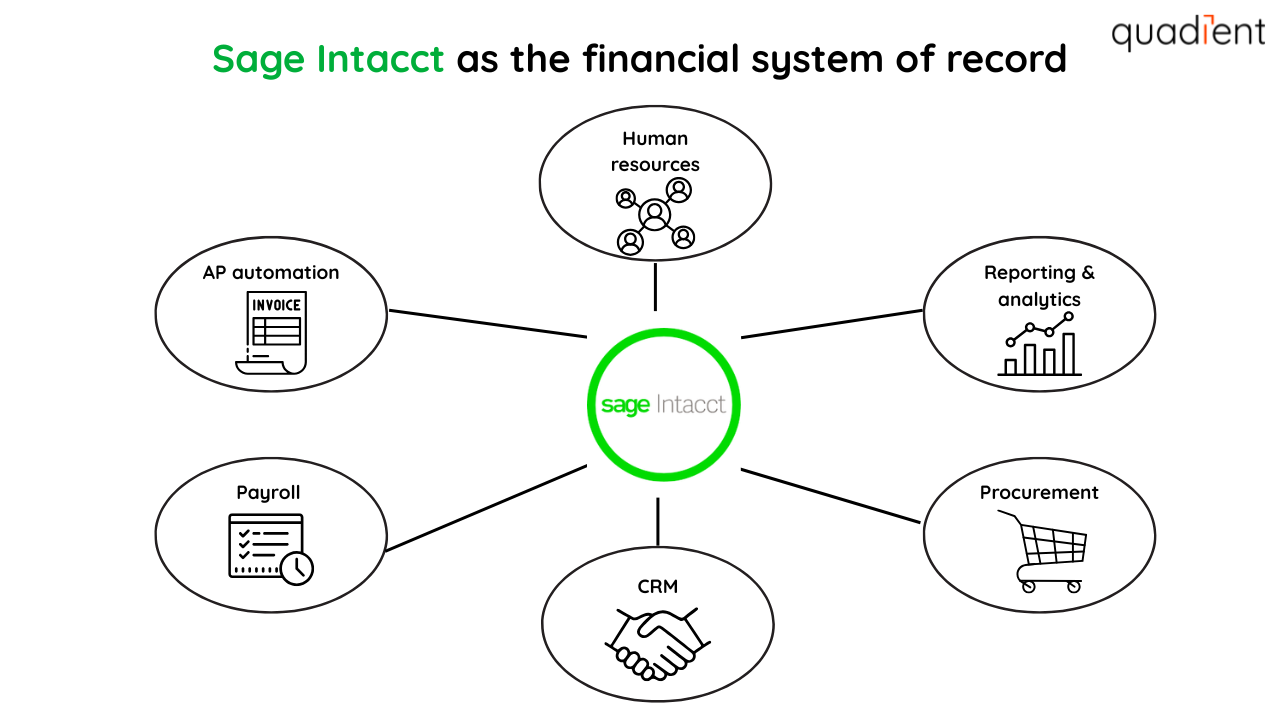
It handles core accounting tasks like general ledger, AP, accounts receivable (AR), cash management and financial reporting. It's used by more than 17,000 organisations in the world. The platform supports multi-entity management, automated consolidation and real-time financial visibility.
As a financial ERP, Sage Intacct connects to payroll, human resources, customer relationship management (CRM), procurement, as well as other business systems. This creates a single source of truth for financial data and helps teams automate workflows across the organisation.
How do Sage Intacct integrations work?
In simple terms, integrations connect Intacct to other business systems, so data moves automatically without manual entry.
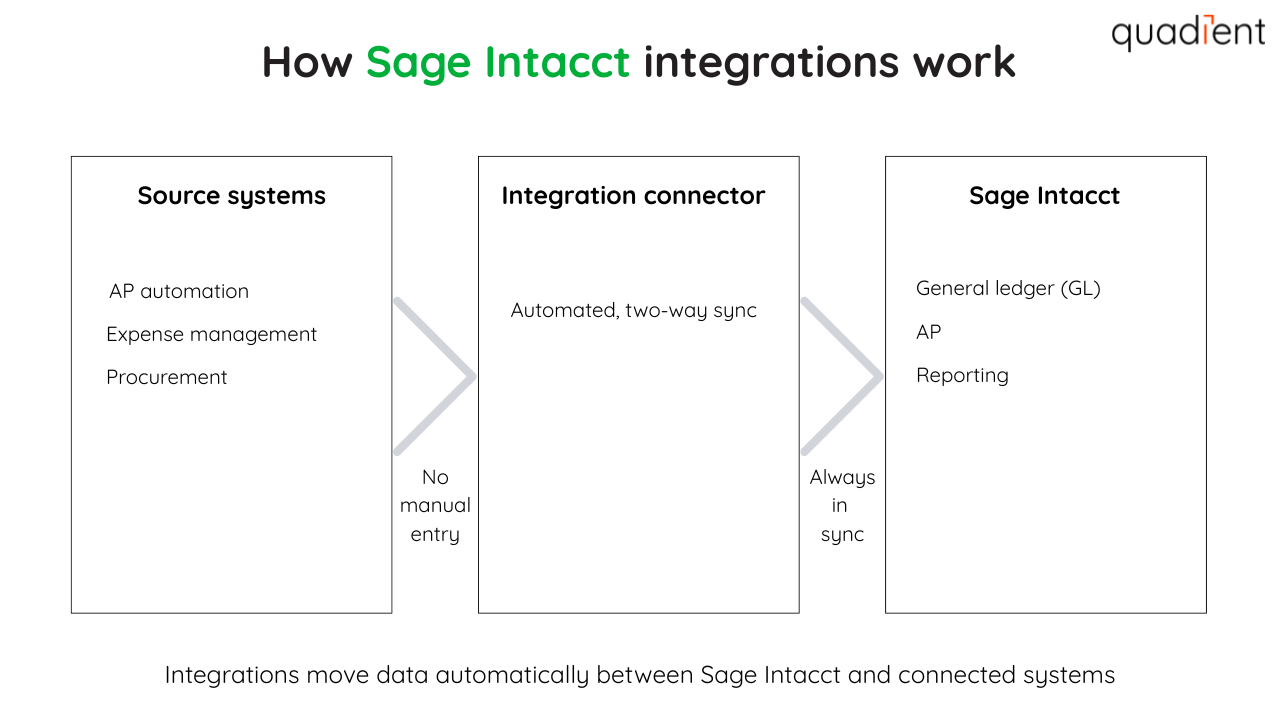
Integrations connect Intacct to the tools your teams already use, keeping invoices, payments and records in sync from start to finish. For example, an AP automation integration can capture invoices, manage approvals and post approved bills directly into Intacct. This reduces rekeying, lowers the risk of errors and keeps payables moving.
With more than 350 options available in the Sage Intacct Marketplace, finance teams can extend Intacct with tools for AP, payments, reporting and operations without disrupting existing workflows.
The list of must-have Sage Intacct integrations
Intacct supports a lot of integration options, but a few stand out for finance teams. Below are the most common categories and the key value they bring:
AP automation integrations
AP automation tools connect to Intacct to capture invoices, route approvals and automatically sync bills. This reduces paper, cuts manual data entry and gives your team better visibility into payables.
Global payments and multi-currency integrations
For companies with international vendors, these integrations simplify mass payments, currency conversion and cross-border payables. Global payment solutions that integrate with Intacct can help to manage exchange rates and simplify payments.
Purchase order management integrations
Purchase order and procurement integrations make buying processes easier. They improve approvals and increase spending visibility. They connect purchasing activity to Intacct so POs and bills flow through cleanly, helping finance teams control costs and avoid surprises.
Employee expense management integrations
Expense tools let employees capture receipts, submit reports and get approvals from anywhere. Once approved, expenses are automatically synced into Intacct. This speeds up reimbursements and improves policy compliance.
Other integrations
Intacct also connects with customer relationship management (CRM), e-commerce, project management, payroll and AR automation tools. These integrations help keep data consistent across systems and support more complete financial reporting.
What are the benefits of integrations for Sage Intacct?
Integrating Sage Intacct with other business systems can help finance teams work more efficiently and with greater confidence. Key benefits include:
Faster AP and purchasing processes
Integrations replace paper invoices, emails and spreadsheets with automated workflows. AP and procurement tools centralise invoice capture, approvals and coding, helping teams move faster while maintaining control.
Less manual work and fewer errors
When systems are connected, data flows automatically. This reduces duplicate data entry and limits errors caused by manual input.
More efficient payments, including global payments
AP and payment integrations automate the full process from invoice approval to payment. Organisations with international vendors find it easier to convert currency. They also find cross-border payments simpler.
Real-time reporting and visibility
Integrated systems keep Intacct up to date with the latest data. Reports reflect current activity across AP, purchasing and operations, giving leaders clearer insight into cash flow and performance.
Stronger controls and compliance
Standardised workflows, approval rules and audit trails help improve internal controls. Integrations also support compliance with tax, expense and payment policies, reducing risk as organisations scale.
How to set up Sage Intacct integrations
Most Intacct integrations use pre-built connectors, APIs or no-code tools. Set-up is usually straightforward and follows a few key steps:
Connect the systems Link the third-party tool to Sage Intacct using secure credentials or an API connection.
Map your data Align accounts, vendors, departments and other fields so data flows correctly between systems.
Test and validate Run test transactions to confirm everything syncs accurately and approvals, coding and reporting work as expected.
Go live and monitor Once live, monitor the integration for errors and make adjustments as your workflows evolve.
Many providers offer training and implementation support to help teams get up and running quickly.
Choosing the right integrations
Not all integrations are created equal. Focus on tools that fit your team today and can scale with you tomorrow.
Ease of use: Look for integrations that are simple to set up and manage without heavy IT involvement.
Cost and return on investment (ROI): Weigh the total cost against time savings, error reduction and process improvements.
Scalability: Make sure the solution supports multi-entity management and future growth.
Security and compliance: Choose integrations with strong controls, audit trails and data security standards.
Conclusion
Sage Intacct integrations help finance teams do more with less. By connecting Intacct to the right tools, organisations can reduce manual work, speed up AP and improve financial visibility without adding complexity. As businesses grow, integrations help them to maintain control. They also support multi-entity management and ensure accurate reporting. Solutions like Quadient AP Automation help teams streamline invoice processing and approvals while keeping Intacct as the single source of truth. Learn more about Quadient’s Sage Intacct integration here: https://www.quadient.com/en/ap-automation/integrations/sage-intacct
Want to learn more about integrations? Please check related articles: